Wednesday, November 15, 2023

DevOps Bootcamp Mar 2024 Schedule | DevOps & AWS Azure Cloud Coaching by Coach AK | DevOps and Cloud Computing Online Classes |

The DevOps requirements in the IT market space is expected to grow by 35% by 2024. Getting a DevOps education now is a great investment into your future, which will pay off very fast!

You are in the right place to kick start your career in DevOps. DevOps is one of the top and hot IT skills right now. Currently almost all the employers are struggling to get right resources in their teams who can do the DevOps and automation work..You could be that person by attending this coaching program.


DevOps Coaching schedule Mar 2024 (promotions are available, pls contact Amy)
Date Time Type When?
Mar 09th 09:45 AM CST to 11:25 AM CST on Saturdays
10:35 AM CST to 12:30 PM CST on Sundays    
Weekends Sat/Sundays
Mar 11th 6:00 to 8:00 PM CST Weekdays Mondays/Wednesdays    

DevOps Coaching Highlights:
  • Comprehensive hands on knowledge on Git, Jenkins, Maven, SonarQube, Nexus, Terraform, Ansible, Docker, Kubernetes, Helm, Prometheus, Docker registry, Helm, AWS and Azure cloud platform.
  • Coach is having about 23+ yrs of professional IT experience, 9+ Yrs in DevOps/Cloud computing/Automation.
  • Many students already got placed in reputed companies from this coaching program successfully.
  • Working as a Sr.DevOps Coach/Architect in a one of the top IT services companies in USA.
  • Unique program...less theory, more hands on lab exercises 
  • Resume preparation will be done with candidates personally.
  • One-to-one Interview coaching.
  • Coaching is purely hands on with 101% job relevant.
  • 100% job assistance.
  • Coached about 1800+ students successfully for past five years and many of my students got placed with many large enterprises in DFW, Charlotte, Houston, Austin, Chicago, Florida, Seattle, Bay area, Ohio, NJ and NY areas.

To join DevOps Coaching classes, please contact Coach AK below:

Contact no # : +1(469)733-5248
WhatsApp #: +1 (469)733-5248
Email id: devops.coaching@gmail.com
Contact: Coach AK

Thursday, November 9, 2023

How to Integrate Artifactory with Azure DevOps | Upload Artifacts from Azure DevOps YAML Pipelines to Artifactory | Artifactory and Azure DevOps Integration | Upload Java WAR file into Artifactory from Azure Pipelines

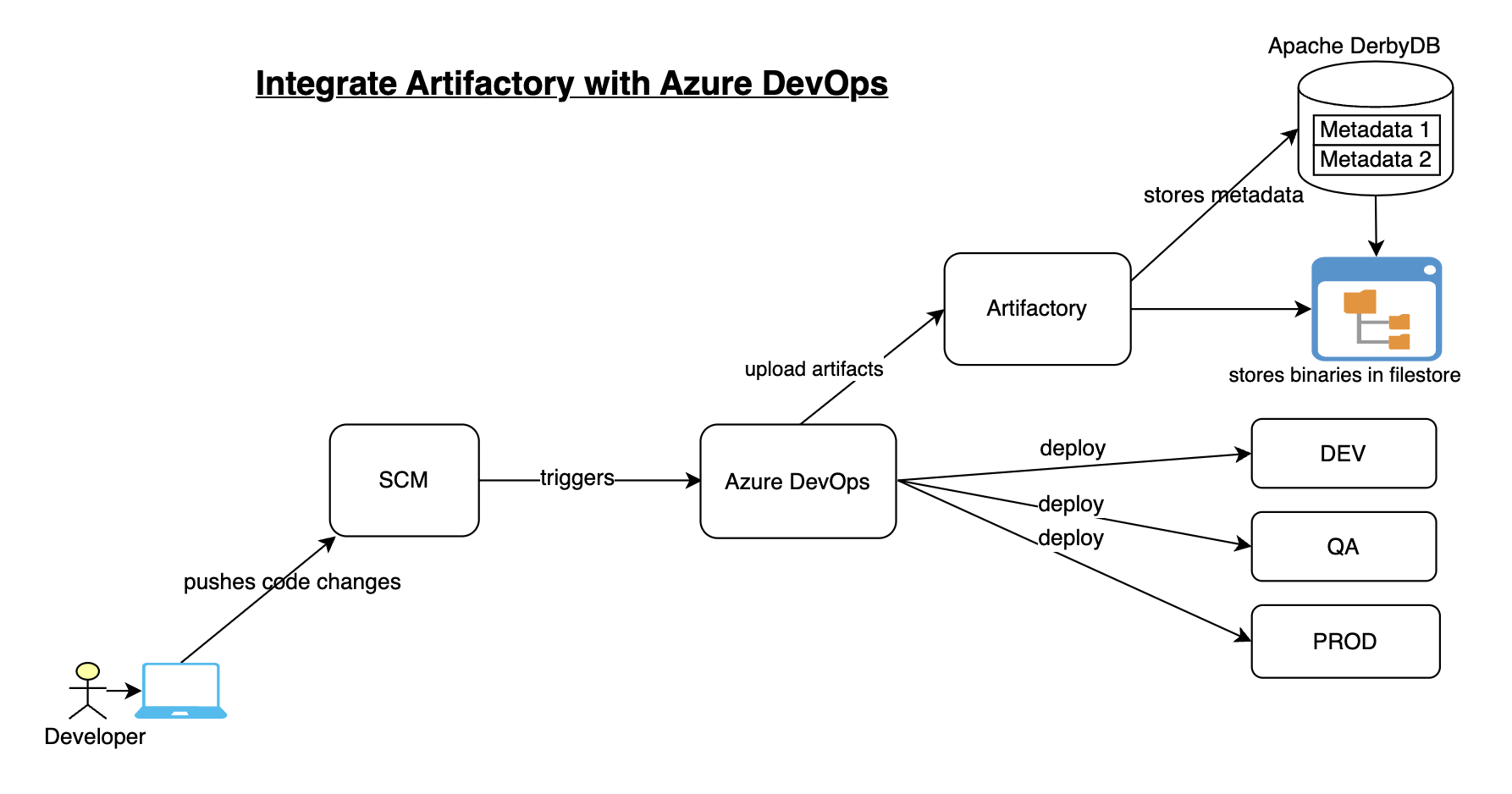
How to integrate Artifactory with Azure DevOps for uploading build artifacts?


Artifactory is one of the popular binary repository managers. It is Java based open source tool, used for storing build artifacts and docker images.

Some of the key features of Artifactory:
  • Supports 27 different package types including helm charts, docker images regardless of tech stack.
  • A single source of truth for all your binaries
  • Integration with all CICD tools
  • role based authorization with teams to manage artifacts 
  • you can create local, remote and virtual repositories
Pre-requisites:

We will automate building a Java project configured in GitHub and we will use Maven to build, package in Azure YAML pipeline and upload WAR file into Artifactory.

Steps to be followed to create a pipeline:

Create a Pipeline:
Login to your Azure Devops dashboard https://dev.azure.com


Go to Pipelines, Click New
select your SCM, in my case, Java Web App code is in GitHub.


Select the Java Repo, select Maven from the option. This will generate YAML file for us.

Add a task for uploading WAR file.
Click on Show assistant, search for generic and select JFrog Generic Artifacts


Choose Upload as command, choose service connection for Artifactory, enter *.war as pattern, enter repo name where artifact will be uploaded. Click on Add.


Now save the pipeline.. Run the pipeline

Azure DevOps YAML Pipeline Code

using the pipeline code we can automate build using Maven and upload WAR file into Artifactory

# Build your Java project using Maven and Upload WAR file to Artifactory

trigger:
- main
pool:
vmImage: ubuntu-latest
steps:
- task: Maven@3
inputs:
mavenPomFile: 'MyWebApp/pom.xml'
mavenOptions: '-Xmx3072m'
javaHomeOption: 'JDKVersion'
jdkVersionOption: '1.8'
jdkArchitectureOption: 'x64'
publishJUnitResults: true
testResultsFiles: '**/surefire-reports/TEST-*.xml'
goals: 'package'
- task: JFrogGenericArtifacts@1
inputs:
command: 'Upload'
connection: 'Artifactory_svc_conn'
specSource: 'taskConfiguration'
fileSpec: |
{
"files": [
{
"pattern": "*.war",
"target": "libs-snapshot-local"
}
]
}
failNoOp: true

Now login to Artifactory..Click on Artifactory --> Artifacts. We can see the WAR file being uploaded.


This is how we can easily integrate Artifactory with Azure DevOps for uploading build artifacts.

Watch Steps in YouTube channel:

Saturday, October 21, 2023

Fix for Kubernetes Deployment Error using helm chart | Error: kubernetes cluster unreachable: exec plugin: invalid apiversion "client.authentication.k8s.io/v1alpha1"

Error: kubernetes cluster unreachable: exec plugin: invalid apiversion "client.authentication.k8s.io/v1alpha1"


Root cause and fix:
Downgrading helm version to 3.8.2 would resolve the issue.

curl -L https://git.io/get_helm.sh | bash -s -- --version v3.8.2

Monday, October 9, 2023

How to Recover Artifactory Admin password | Artifactory admin password unlock | Forgotten Artifactory Admin Password | How to Recover Artifactory admin password

Let's say you have forgotten Artifactory admin password. How to reset or retrieve Artifactory admin password? Here below are the steps for resetting Artifactory admin password:

Please follow the steps to recover Artifactory Admin password:

Pre-requisites:

Steps to reset Artifactory Admin password:

1. Login to Artifactory instance. Navigate to below directory:

cd /opt/jfrog/artifactory/var/etc

2. Create a file called bootstrap.creds under access directory

sudo vi access/bootstrap.creds

3.  Add  below entries:

admin@*=Admin@12345

4. Make sure the file has relevant permissions: 

sudo chmod 600 access/bootstrap.creds
sudo chown artifactory:artifactory access/bootstrap.creds

5. Restart Artifactory service (you need to stop the service first and then start again)
sudo systemctl stop artifactory.service
sudo systemctl start artifactory.service

6. Check the status if Artifactory is working fine
sudo systemctl status artifactory.service

7. You can also check the logs

sudo tail -f /var/opt/jfrog/artifactory/log/artifactory-service.log


8. Now login with changed admin credentials


Watch steps in YouTube channel:

Sunday, October 8, 2023

Install JFrog Artifactory on Linux instance | Setup JFrog Artifactory on Ubuntu | Install JFrog Artifactory 7.X on Ubuntu 22.0.4

Artifactory is one of the popular binary repository managers. It is Java based open source tool, used for storing build artifacts and docker images.

Some of the key features of Artifactory:
  • Supports 27 different package types including helm charts, docker images regardless of tech stack.
  • A single source of truth for all your binaries
  • Integration with all CICD tools
  • role based authorization with teams to manage artifacts 
  • you can create local, remote and virtual repositories


Artifactory can be integrated with many Continuous integration and Continuous delivery tools. Artifactory is mainly used by Ant, Maven and Gradle build tools. Let us see how to install Artifactory on Ubuntu 22.0.4 using Deb packages.

Pre-requisites:
  • VM needs to have at least 4GB RAM, for AWS choose at least medium instance type.
  • Default ports 8081 and 8082 needs to be opened. 8081 for Artifactory REST APIs. 8082 for everything else (UI, and all other product’s APIs).
Change Host Name to Artifactory
sudo hostnamectl set-hostname Artifactory

Update Ubuntu OS
sudo apt update

Add JFrog Artifactory APT repository
echo "deb https://releases.jfrog.io/artifactory/artifactory-debs xenial main" | sudo tee -a /etc/apt/sources.list.d/artifactory.list


Import repository GPG key by running the following commands
curl -fsSL  https://releases.jfrog.io/artifactory/api/gpg/key/public|sudo gpg --dearmor -o /etc/apt/trusted.gpg.d/artifactory.gpg

Update the package
sudo apt update

Install Artifactory
sudo apt install jfrog-artifactory-oss -y
The above message should confirm Artifactory have been successfully installed.
Now let us start Artifactory service.

Start Artifactory 
sudo systemctl start artifactory.service
Create symbolic link
sudo systemctl enable artifactory.service


Check whether Artifactory is running?
sudo systemctl status artifactory.service

Press q to quit 

You can also check the logs

sudo tail -f /var/opt/jfrog/artifactory/log/artifactory-service.log


Check if service is running locally on 8081 port

curl localhost:8081

Access Artifactory App
Go to browser and open public IP/DNS name along with port no:8081
http://your_public_dns_name:8081

You should see Artifactory welcome page, login with default username and password which is
admin/password


After Login, click on Get started. 

Now reset admin password. enter as Admin1234/Admin1234

Skip for base URL and skip proxy setup
Click Next, click on Finish


That's it! Artifactory is setup successfully.

How to Integrate Artifactory and Jenkins?
https://www.coachdevops.com/2020/04/integrate-artifactory-with-jenkins.html

You can watch the steps in details on our YouTube channel:
  

Thursday, September 28, 2023

CICD Process Flow Diagram | Implement CICD using Azure DevOps, SonarQube, Artifactory and Slack

 CICD Process Flow Diagram - How to Implement CICD using Azure DevOps?


Azure DevOps is a set of development tools and services offered by Microsoft to facilitate the entire software development lifecycle (SDLC). Azure DevOps is designed to support collaboration among development and operations teams, automate various aspects of the software development process, and enable continuous integration and continuous delivery (CI/CD) pipelines.

What is Continuous Integration?

Continuous integration is a DevOps software development practice where developers regularly merge their code changes into a central repository, after which automated builds and tests are run.

The key goals of continuous integration are to find and address bugs quicker, improve software quality, and reduce the time it takes to validate and release new software updates.

Azure DevOps is widely used for implementing CICD. Azure DevOps can integrate with other tools using Add-ons.

How does Continuous Integration Work?

Developers frequently commit to a shared repository using a version control system such as Git. Prior to each commit, developers may choose to run local unit tests on their code as an extra verification layer before integrating. A continuous integration service automatically builds and runs unit tests on the new code changes to immediately surface any errors.

Benefits of Continuous Integration
  • Improve Developers productivity 
  • Find bugs early in the software development stage
  • Deliver products into market place sooner
  • Improve the feedback loop
What is Continuous Delivery?

Continuous delivery is a software development practice where code changes are automatically prepared for a release to production. Continuous delivery is the next extension of continuous integration. The delivery phase is responsible for packaging an artifact together to be delivered to end-users. This phase runs automated building tools to generate this artifact.

Benefits of Continuous Delivery
  • Automate the Software Release Process
  • Improve Developer Productivity
  • Find bugs early in the software development stage
  • Deliver updates faster

DevOps & DevSecOps Prerequisites | Get Ready for AI-Enabled DevSecOps Hands-On Labs

  🚀 Get Ready for Your DevSecOps Hands-On Labs Welcome, DevOps Champ! Before starting the hands-on labs in the AI-Enabled DevSecOps Mastery...