
Saturday, January 31, 2026

Wednesday, January 28, 2026
How to integrate SonarQube Cloud with Azure DevOps YAML Pipeline | SonarQube Cloud Integration with Azure DevOps | Automate Code Scan using SonarQube Cloud In Azure YAML Pipelines
Please find steps below for integrating SonarQube Cloud to perform static code analysis from Azure DevOps and automate this workflow by writing Azure devops yaml pipeline.

Pre-requisites in SonarQube Cloud:
Visit https://sonarcloud.io/

Click on Azure DevOps, enter your Microsoft credentials.
Create an Organization, click on Import from a DevOps platform


- Azure DevOps Account
- Make sure Java Project is setup in Azure Repos and default branch is either main or master.
- Make sure you install SonarCloud plug-in/Add-on in Azure DevOps using below URL:
How to add SonarQube Cloud plug-in in Azure DevOps?
And look for SonarQube Cloud Add-on


Once added SonarQube plug-in, click on proceed to Organization..

How to integrate SonarQube Cloud with Azure DevOps:
Create Token in SonarQube Cloud to authenticate with Azure DevOps
You need to login to SonarQube using your admin password. admin/admin123 and click on Admin on your top side.

Click on My Account, Security.
Under Tokens, Give some value for token name and choose Global analysis token, click on generate Tokens. Copy the token value generated.

Create Service Connections in Azure DevOps
Login to Azure DevOps. Select your project dashboard.

Click on Project settings --> Service connections
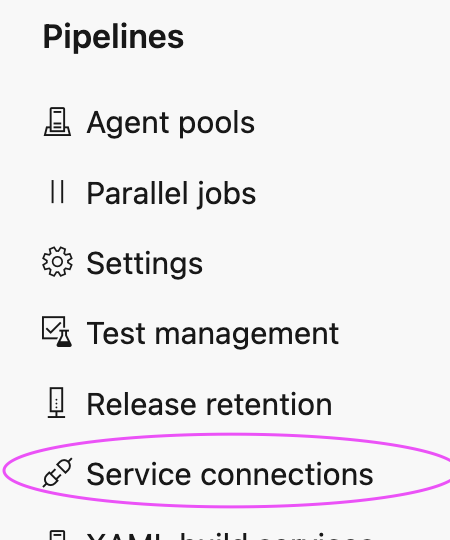
click on New service connection

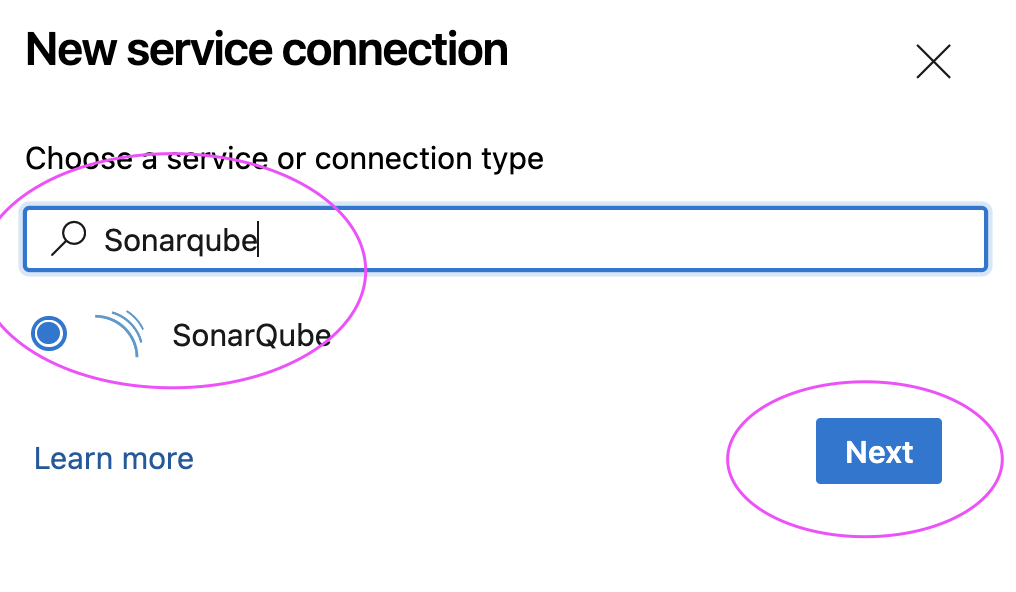
and enter Token created 

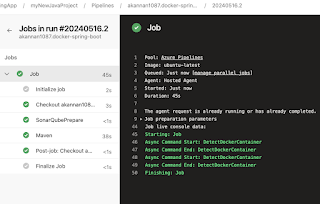
Click on Save and Queue to kick start build.
Now login to SonarCloud dashboard, click on Projects:

Give name for service connection and select grant access permission to all pipelines.
Click on Save.


2. Select your GitHub repo and select the Maven as YAML pipeline template

Create a YAML Pipeline in Azure DevOps
1. Login to Azure DevOps. Go to Azure Pipelines. Click on create a new pipeline, Select GitHub:


3. Click on show assistant on right hand side, type SonarQube and select Prepare Analysis on SonarQube task and then select Service connection from the drop down and choose Integrate with Maven or Gradle option and then click on Add task

Sample Code for entire pipeline is here below
Azure DevOps Pipeline YAML Code:
Azure DevOps Pipeline YAML Code:
trigger:
- main
pool:
vmImage: ubuntu-latest
steps:
- task: SonarCloudPrepare@4
inputs:
SonarQube: 'my_sonar_cloud'
organization: 'mydevopscoachingapp'
scannerMode: 'CLI'
configMode: 'manual'
cliProjectKey: 'MyDevopsCoachingApp_mySep2025WeekendRepo'
cliProjectName: 'MyWebApp'
- task: Maven@4
inputs:
mavenPomFile: 'MyWebApp/pom.xml'
mavenOptions: '-Xmx3072m'
javaHomeOption: 'JDKVersion'
jdkVersionOption: '1.17'
jdkArchitectureOption: 'x64'
publishJUnitResults: true
testResultsFiles: '**/surefire-reports/TEST-*.xml'
goals: 'clean install sonar:sonar'

Click on Save and Queue to kick start build.
Now login to SonarCloud dashboard, click on Projects:

Saturday, January 24, 2026
What is SonarQube Cloud? What is the difference between SonarQube Server and SonarQube Cloud | SonarQube Cloud vs SonarQube Server Explained
What Is SonarQube Cloud?
SonarQube Cloud is a
cloud-based code quality and security analysis tool.
-
It automatically scans your code to find:
- Bugs
- Security vulnerabilities
- Code smells (bad coding practices)
- Managed by SonarSource
- Works directly with cloud CI/CD pipelines
- No server installation or maintenance needed
👉 Think of SonarCloud as a “code quality checker in the cloud”
What Is SonarQube Server?
- SonarQube is the self-hosted version of Sonar’s code analysis platform
- You install and manage it On-prem servers or Virtual machines or Kubernetes
- Requires Server setup, Database & maintenance
Why SonarQubeCloud Matters in DevOps
- Detects issues early in CI/CD pipelines
- Prevents bad or insecure code from reaching production
- Enforces Quality Gates (pass/fail rules)
- Improves Code maintainability, Security posture, Team collaboration
👉 Think of SonarQube as “code quality on your own servers”
🔄 SonarQube Server vs SonarQube Cloud (Easy Comparison)
| Feature | SonarQube Server | SonarQube Cloud |
|---|---|---|
| Hosting | Self-hosted (on-prem or private cloud) | Fully cloud-hosted (SaaS) |
| Setup | Manual install & config | No setup needed |
| Maintenance | You manage servers, upgrades, scaling | Zero maintenance, Sonar handles everything |
| Cost | Free + paid tiers for advanced features | Subscription based on lines of code; free for public repos |
| Data Control | Full control over data and environment | Data stored in SonarCloud’s infrastructure |
| Best For | Enterprises, regulated orgs | Cloud & DevOps teams |
| Integrations | Works with most CI/CD systems, including on-prem | Deep integration with GitHub, GitLab, Bitbucket Cloud, Azure DevOps |
| Branch/PR Analysis | Requires Developer Edition or higher | Included by default |
| Customization | Supports plugins, custom rules, and deep configuration | More limited customization compared to SonarQube |
| Scalability | You scale it | Auto-scales |
When Should You Use SonarQube Cloud?
- You use GitHub / Azure DevOps / Bitbucket
- You want quick setup
- You don’t want to manage servers
- You’re building Cloud-native apps or DevSecOps pipelines or Open-source projects
🧠 Additional Context (Industry Understanding)
Even though the article highlights practical differences, other sources also emphasize technical nuance:- Both tools use the same core analysis engine (so results and rules are similar), but SonarCloud is optimized for cloud workflows and integrates first-class with GitHub, GitLab, Bitbucket, and Azure DevOps.
- SonarCloud is typically easier to start with because it’s SaaS, but enterprises with strict compliance might prefer SonarQube’s on-prem deployment options.
📝 Final Thoughts
- SonarQube Cloud = Best for modern DevOps & cloud teams
- SonarQube Server = Best for enterprise & on-prem needs
- Both help you shift-left security and quality
👉 If you’re learning DevOps, DevSecOps, or CI/CD, mastering SonarQube Cloud is a must.
SonarQube Cloud is ideal for teams who want zero maintenance and fast cloud adoption. SonarQube Server is best for organizations needing data control, customization, and on‑prem compliance. Difference between SonarQube Cloud and SonarQube Server:
Friday, January 2, 2026
Master DevSecOps and Multi Cloud Computing Course by Coach AK | DevSecOps and Cloud Computing Online Classes | March 2026 Schedule
Live Hands-On Bootcamp - March 2026
 🚀 Supercharge your DevOps career with real-world skills!
🔥 What You’ll Learn
👉 Master leading DevSecOps tools & cloud platforms including:
✔ Git, GitHub, Bitbucket, Azure Repos
✔ Jenkins, GitHub Actions, Azure DevOps
✔ SonarQube, Trivy, Nexus, Slack
✔ Terraform, Ansible
✔ Docker & Kubernetes
✔ Helm, Prometheus & more!
🌐 AWS & Azure Multi-Cloud Training Included!
🧠 Real-World, Practical Training
✔ 100% Hands-On Projects
✔ Live Interactive Sessions
✔ Career Support: Resume + Interview Prep
✔ Build Recruiter-Ready Skills!
📅 Schedule Options
📍 Weekend Batch
🗓 Starts March 21st, 2026
🕤 Sat – 11:45 AM to 1:45 PM CST
🕥 Sun – 1:30 PM to 3:30 PM CST
📍 Weekday Evening Batch
🗓 Starts March 24th, 2026
🕕 Tue & Thu – 6:00 PM to 8:00 PM CST
🌎 Online – Learn From Anywhere!
📌 Why Join This Bootcamp?
✅ Fully hands on coaching
✅ Industry-Relevant Projects
✅ Expert Coaching by Coach AK
✅ Flexible Schedules for Working Pros
✅ Multi-Cloud + Security Focus
✅ Networking & Career Growth Support
✅ Industry-Relevant Projects
✅ Expert Coaching by Coach AK
✅ Flexible Schedules for Working Pros
✅ Multi-Cloud + Security Focus
✅ Networking & Career Growth Support
📞 Register Now – Spots Are Limited!
📱 +1 (469) 733-5248 (WhatsApp Available)
📧 devops.coaching@gmail.com
➡ Early Bird Discounts Available!
🚀 Take the Next Step in Your DevOps Career!
💡 Learn with confidence. Build with purpose. Get hired faster.
Subscribe to:
Comments (Atom)
Coach AK's Master DevSecOps Bootcamp Program Model Information | Master Multi cloud Program Information | AWS Cloud and Azure Cloud DevOps Coaching Program Model Information
(More New Topics..New tools added such as GitHub Actions, Helm, GitHub Advanced Security and Trivy Scanner, CheckOv IAC security ...

-
 Let us learn how to create and configure a Self-Hosted Agent in Azure DevOps (ADO). What is an Agent? An agent is computing infrastructure w...
 -
 Checkov is a static code analysis tool designed to scan Infrastructure as Code (IaC) files and identify potential security and compliance ...
 -
 Please find steps for integrating SonarQube with GitHub Actions: Pre-requisites: Make sure SonarQube is up and running Make sure Java Projec...