Showing posts with label DevSecOps. Show all posts

Sunday, May 24, 2026

How to Setup AquaSec Trivy Vulnerability Scanner | How to install AquaSec Trivy Scanner on Linux OS | Jenkins Pipeline For Scanning MyWebApp | DevSecOps Tutorials

 What is Trivy?

  • open-source security scanner tool developed by Aqua Security. 
  • Used for vulnerability scanning in such as 
    • container images 
    • file systems/folders 
    • Git repositories
    • Kubernetes clusters
    • misconfiguration in files such as Terraform, K8S manifest files
  • Trivy helps identify security issues and misconfigurations early in the software development lifecycle.

Pre-requisites:

  • Any Linux instance is up and running, in our case we will use Jenkins Ubuntu machine

How to Install Trivy scanner on Jenkins Ubuntu EC2 instance?

Trivy scanner can be installed so many ways. Check here for more information. But we will be using APT package manager to install on Ubuntu EC2.

sudo apt-get install wget gnupg -y
wget -qO - https://aquasecurity.github.io/trivy-repo/deb/public.key | gpg --dearmor | sudo tee /usr/share/keyrings/trivy.gpg > /dev/null 
echo "deb [signed-by=/usr/share/keyrings/trivy.gpg] https://aquasecurity.github.io/trivy-repo/deb generic main" | sudo tee -a /etc/apt/sources.list.d/trivy.list 
sudo apt-get update 
sudo apt-get install trivy -y

Check Trivy got installed
trivy --version


This confirm that Trivy got installed successfully.

Jenkins Pipeline 

pipeline {
    agent any

    tools {
        maven 'Maven3'
    }
    stages {
        stage('Checkout') {
            steps {
                git branch: 'main', credentialsId: '', url: 'https://github.com/akannan1087/myApr2026WeekendRepo'
            }
        }
        
        stage ("build") {
            steps {
                echo "doing my build.."
                sh "mvn clean install -f MyWebApp/pom.xml"
            }
        }

    stage ("code coverage") {
        steps {
         jacoco()
        }
    }
    
    stage ("code scan") {
        steps {
        withSonarQubeEnv('SonarQube') {
            sh "mvn sonar:sonar -f MyWebApp/pom.xml"
        }
     }
    }
    
    stage ("security scan") {
        steps {
         sh "trivy fs ."
        }
    }
 }
}


Watch video in my YouTube channel:

Friday, April 4, 2025

DevSecOps Tutorials | How to setup Prowler in AWS cloud to evaluate AWS Security

Prowler is a open source security auditing tool designed to assess security best practices, misconfigurations, and compliance in AWS environments.

Key Features of Prowler:

  •  Customizable, and lightweight
  •  AWS Security Best Practices – Checks for security misconfigurations in AWS services.
  •  Compliance auditing 
  •  Multi-Account Scanning – Can scan multiple AWS accounts.
  •  Multiple Output Formats – Generates JSON, CSV, HTML, and JUnit reports.
  •  Works with CI/CD, AWS Organizations, and automated security workflows 

Pre-requisites:

  • AWS cli installed

Install Required Dependencies:

sudo apt update && sudo apt install -y unzip awscli jq python3-pip git

How to setup in Prowler in AWS cloud?

git clone https://github.com/prowler-cloud/prowler.git

cd prowler

chmod +x prowler

./prowler

Run Prowler Scans

To Run a Full AWS Security Scan. 

./prowler -M json,csv -o prowler-report


Thursday, January 30, 2025

How to Setup AquaSec Trivy for Vulnerability scanning | How to scan Springboot Docker image using Trivy Scanner | Create Jenkins Pipeline for scanning Docker image for Springboot Microservices App

Watch steps in YouTube channel:

Pre-requisites:

Jenkins Pipeline for scanning docker image using Trivy scanner:

pipeline {
    agent any
    environment {
        registry = "acct_id.dkr.ecr.us-east-1.amazonaws.com/coachak/springboot-app"
    }

    stages {
        stage('Checkout') {
            steps {
                git 'https://github.com/akannan1087/docker-spring-boot'
            }
        }
        
        stage ("Build JAR") {
            steps {
                sh "mvn clean install"
            }
        }
        
        stage ("Build image") {
            steps {
                script {
                    dockerImage = docker.build registry
                    dockerImage.tag("$BUILD_NUMBER")
                }
            }
        }
        
    // Scanning Docker images using Trivy scanner
     stage('Trivy Security scan') {
     steps{
         script {
            sh "trivy image --severity HIGH,CRITICAL,MEDIUM acct_id.dkr.ecr.us-east-1.amazonaws.com/coachak/springboot-app:$BUILD_NUMBER"
         }
      }
     }
    // Uploading Docker images into AWS ECR
    stage('Pushing to ECR') {
     steps{  
         script {
                sh 'aws ecr get-login-password --region us-east-1 | docker login --username AWS --password-stdin acct_id.dkr.ecr.us-east-1.amazonaws.com'
                sh 'docker push acct_id.dkr.ecr.us-east-1.amazonaws.com/coachak/springboot-app:$BUILD_NUMBER'
         }
        }
     }
    }
}

Pipeline Output:


Scan report can be viewed in Jenkins


Tuesday, January 21, 2025

How to Setup AquaSec Trivy Vulnerability Scanner | How to install AquaSec Trivy Scanner on Linux OS | Security Scanning Tool | DevSecOps Tutorials

What is Trivy?

  • open-source security scanner tool developed by Aqua Security. 
  • Used for vulnerability scanning in such as 
    • container images 
    • file systems/folders 
    • Git repositories
    • Kubernetes clusters
    • misconfiguration in files such as Terraform, K8S manifest files
  • Trivy helps identify security issues and misconfigurations early in the software development lifecycle.

Pre-requisites:

  • Any Linux instance is up and running, in our case we will use a Ubuntu machine

How to Install Trivy scanner on Linux OS?

Trivy scanner can be installed so many ways. Check here for more information. But we will be using APT package manager to install on Ubuntu EC2.

sudo apt-get install wget gnupg -y
wget -qO - https://aquasecurity.github.io/trivy-repo/deb/public.key | gpg --dearmor | sudo tee /usr/share/keyrings/trivy.gpg > /dev/null 
echo "deb [signed-by=/usr/share/keyrings/trivy.gpg] https://aquasecurity.github.io/trivy-repo/deb generic main" | sudo tee -a /etc/apt/sources.list.d/trivy.list 
sudo apt-get update 
sudo apt-get install trivy -y

Check Trivy got installed
trivy --version


This confirm that Trivy got installed successfully.

Perform Docker image scan locally
trivy image nginx:latest

where nginx is name of the docker image

You can also pass arguments to filter based on severity
trivy image --severity HIGH,CRITICAL,MEDIUM nginx:latest

Perform scanning a Git Repo

where repo_url is the public git repo that you want to scan

Perform scanning a file system locally
trivy fs your_folder

where your_folder is directory on your machine where you have installed Trivy.

Additional links:
If you want to integrate Trivy with Jenkins CICD pipeline for automating docker image scanning, please click here.
If you want to integrate Trivy with Azure DevOps CICD pipeline for automating docker image scanning, please click here.

Watch video in my YouTube channel:

Friday, January 10, 2025

Perform Security Scan for SpringBoot Microservice Docker image using Trivy Scanner and Azure YAML Pipeline | How to Scan Spring Boot Docker Image in Azure DevOps using Trivy Scanner

Perform vulnerability scan using Trivy scanner on Azure DevOps Pipeline


What is Trivy?
Trivy is an open-source security scanner tool developed by Aqua Security. It can scan:
    • container images 
    • file systems/folders 
    • Git repositories
    • Kubernetes clusters
    • misconfiguration in files such as Terraform, K8S manifest files

Pre-requisites:

ADO Yaml Pipeline for scanning docker image using Trivy scanner in Azure Hosted Build Agent:
# Perform Trivy scan for Docker image and upload docker image into ACR

trigger:
- master

resources:
- repo: self

variables:
# Container registry service connection established during pipeline creation
dockerRegistryServiceConnection: '723477ce-4e05-4e6e-a3c1-13bdf919a5cd'
imageRepository: 'dockerspringbootapp'
containerRegistry: 'myacrrepo131.azurecr.io'
dockerfilePath: '$(Build.SourcesDirectory)/Dockerfile'
tag: '$(Build.BuildId)'

# Agent VM image name
vmImageName: 'ubuntu-latest'

stages:
- stage: Build
displayName: Build and push stage
jobs:
- job: Build
displayName: Build
pool:
vmImage: $(vmImageName)
steps:
- task: Maven@4
inputs:
mavenPomFile: 'pom.xml'
publishJUnitResults: true
testResultsFiles: '**/surefire-reports/TEST-*.xml'
javaHomeOption: 'JDKVersion'
mavenVersionOption: 'Default'
mavenAuthenticateFeed: false
effectivePomSkip: false
sonarQubeRunAnalysis: false
- task: Docker@2
displayName: Build a Docker image
inputs:
command: build
repository: $(imageRepository)
dockerfile: $(dockerfilePath)
containerRegistry: $(dockerRegistryServiceConnection)
tags: |
$(tag)
- task: Bash@3
displayName: "Install Trivy"
inputs:
targetType: inline
script: |
curl -sfL https://raw.githubusercontent.com/aquasecurity/trivy/main/contrib/install.sh | sh
# Run Trivy Scan
- task: Bash@3
displayName: "Run Trivy Scan"
inputs:
targetType: inline
script: |
./bin/trivy image --severity HIGH,CRITICAL,MEDIUM --ignore-unfixed $(containerRegistry)/$(imageRepository):$(tag)
- task: Docker@2
displayName: push the image to container registry
inputs:
command: Push
repository: $(imageRepository)
dockerfile: $(dockerfilePath)
containerRegistry: $(dockerRegistryServiceConnection)
tags: |
$(tag)

Scan report can be viewed in Build output of Azure Pipelines


Watch Steps in YouTube channel:

Thursday, January 9, 2025

Setup AquaSec Trivy for Vulnerability scanning | How to Set Up Trivy Scanner in Azure DevOps | How to scan Docker image using Trivy Scanner | Create Azure YAML Pipeline for scanning Docker image

How to perform vulnerability scan using Trivy scanner on Azure DevOps Pipeline?


Pre-requisites:

ADO Yaml Pipeline for scanning docker image using Trivy scanner:
# Docker
# Build and push an image to Azure Container Registry
# https://docs.microsoft.com/azure/devops/pipelines/languages/docker
trigger:
- master
resources:
- repo: self

variables:
# Container registry service connection established during pipeline creation
dockerRegistryServiceConnection: 'd676875f-d1fb-485a-8da4-88d6bfb04604'
imageRepository: 'mypythondockerrepo'
containerRegistry: 'myacrrep31.azurecr.io'
dockerfilePath: '$(Build.SourcesDirectory)/Dockerfile'
tag: '$(Build.BuildId)'

vmImageName: 'ubuntu-latest'

stages:
- stage: Build
displayName: Build and push stage
jobs:
- job: Build
displayName: Build
pool:
vmImage: $(vmImageName)
steps:
# build docker image
- task: Docker@2
displayName: Build Docker image
inputs:
command: build
repository: $(imageRepository)
dockerfile: $(dockerfilePath)
containerRegistry: $(dockerRegistryServiceConnection)
tags: |
$(tag)
# Install Trivy Scanner on Agent
- task: Bash@3
displayName: "Install Trivy"
inputs:
targetType: inline
script: |
curl -sfL https://raw.githubusercontent.com/aquasecurity/trivy/main/contrib/install.sh | sh
# Run Trivy Scan
- task: Bash@3
displayName: "Run Trivy Scan"
inputs:
targetType: inline
script: |
./bin/trivy image --severity HIGH,CRITICAL,MEDIUM --ignore-unfixed $(containerRegistry)/$(imageRepository):$(tag)
# Push docker image
- task: Docker@2
displayName: push Docker image to container registry
inputs:
command: push
repository: $(imageRepository)
dockerfile: $(dockerfilePath)
containerRegistry: $(dockerRegistryServiceConnection)
tags: |
$(tag)

Scan report can be viewed in Build output of Azure Pipelines


Sunday, November 17, 2024

How to Configure GitHub Advanced Security for Azure DevOps | How to Perform Security scan for Azure Repos using GitHub Advanced Security

GitHub Advanced Security for Azure DevOps brings the secret scanning, dependency scanning and CodeQL code scanning solutions already available for GitHub users and natively integrates them into Azure DevOps to protect your Azure Repos and Pipelines. 


Pre-requisites:

How to Set up dependency scanning?

Dependency scanning is a pipeline-based scanning tool. Results are aggregated per repository. It's recommended that you add the dependency scanning task to all the pipelines you'd like to be scanned.

Add the task Advanced Security Dependency Scanning task (AdvancedSecurity-Dependency-Scanning@1) directly to your YAML pipeline file or select the Advanced Security Dependency Scanning task from the task assistant.

How to Set up code scanning

Code scanning is also a pipeline-based scanning tool where results are aggregated per repository.

Add the tasks in the following order:

  1. Advanced Security Initialize CodeQL (AdvancedSecurity-Codeql-Init@1)
  2. Your custom build steps
  3. Advanced Security Perform CodeQL Analysis (AdvancedSecurity-Codeql-Analyze@1)
Pipeline YAML Code for scanning Java code using GitHub Advanced Security

Create a Pipeline:
Login to your Azure Devops dashboard https://dev.azure.com


Go to Pipelines, Click New, 
select your SCM.


Select your Repository. Use starter pipeline and copy and paste the below code:


trigger:
- main

resources:
- repo: self

variables:
tag: '$(Build.BuildId)'

stages:
- stage: Build
displayName: Build image
jobs:
- job: Build
displayName: Build
pool:
vmImage: ubuntu-latest
steps:
- task: AdvancedSecurity-Codeql-Init@1
inputs:
languages: 'java'
- task: Maven@4
inputs:
mavenPomFile: 'pom.xml'
goals: 'install'
publishJUnitResults: true
testResultsFiles: '**/surefire-reports/TEST-*.xml'
javaHomeOption: 'JDKVersion'
mavenVersionOption: 'Default'
mavenAuthenticateFeed: false
effectivePomSkip: false
sonarQubeRunAnalysis: false
- task: AdvancedSecurity-Dependency-Scanning@1
- task: AdvancedSecurity-Codeql-Analyze@1

Where to see the Scan resule in Azure DevOps?


Monday, November 4, 2024

What is GitHub Advanced Security for Azure DevOps | How to Enable GitHub Advanced Security for Azure DevOps ?

GitHub Advanced Security for Azure DevOps brings the secret scanning, dependency scanning and CodeQL code scanning solutions already available for GitHub users and natively integrates them into Azure DevOps to protect your Azure Repos and Pipelines.


These scanning tools will natively embed automated security checks into the Azure DevOps platform, allowing developers to secure their code, secrets and supply chain without leaving their workflow.

Azure DevOps Advanced Security provides below security features to help organizations identify and address security vulnerabilities in their development processes.

  • Secret Scanning push protection: check if code pushes include commits that expose secrets such as credentials
  • Secret Scanning on repos: scan your repository and look for exposed secrets that were committed accidentally
  • Dependency Scanning – search for known vulnerabilities in open source dependencies (direct and transitive)
  • Code Scanning – use CodeQL static analysis engine to identify code-level application vulnerabilities such as SQL injection and authentication bypass.
Scope of GitHub Advanced Security for Azure DevOps
  • only available for Git repositories
  • only available for Azure DevOps services, not available in Azure DevOps Server(old TFS) 

Pre-requisites:

Enable GitHub Advanced Security
You can enable Advanced Security at the organization, project, or repository level.

Organization-level onboarding
  1. Go to your Organization settings for your Azure DevOps organization.
  2. Select Repositories.
  3. Select Enable all and see an estimate for the number of active committers for your organization appear.
  4. Select Begin billing to activate Advanced Security for every existing repository in each project in your organization.
  5. Optionally, select Automatically enable Advanced Security for new repositories so that any newly created projects have Advanced Security enabled upon creation.

Project-level onboarding

  1. Go to your Project settings for your Azure DevOps project.
  2. Select Repos.
  3. Select the Settings tab.
  4. Select Enable all and see an estimate for the number of active committers for your project appear.
  5. Select Begin billing to activate Advanced Security for every existing repository in your project.
  6. Optionally, select Automatically enable Advanced Security for new repositories so that any newly created repositories have Advanced Security enabled upon creation.
Repository-level onboarding
  1. Go to your Project settings for your Azure DevOps project.
  2. Select Repos > Repositories.
  3. Select the repository you want to enable Advanced Security for.
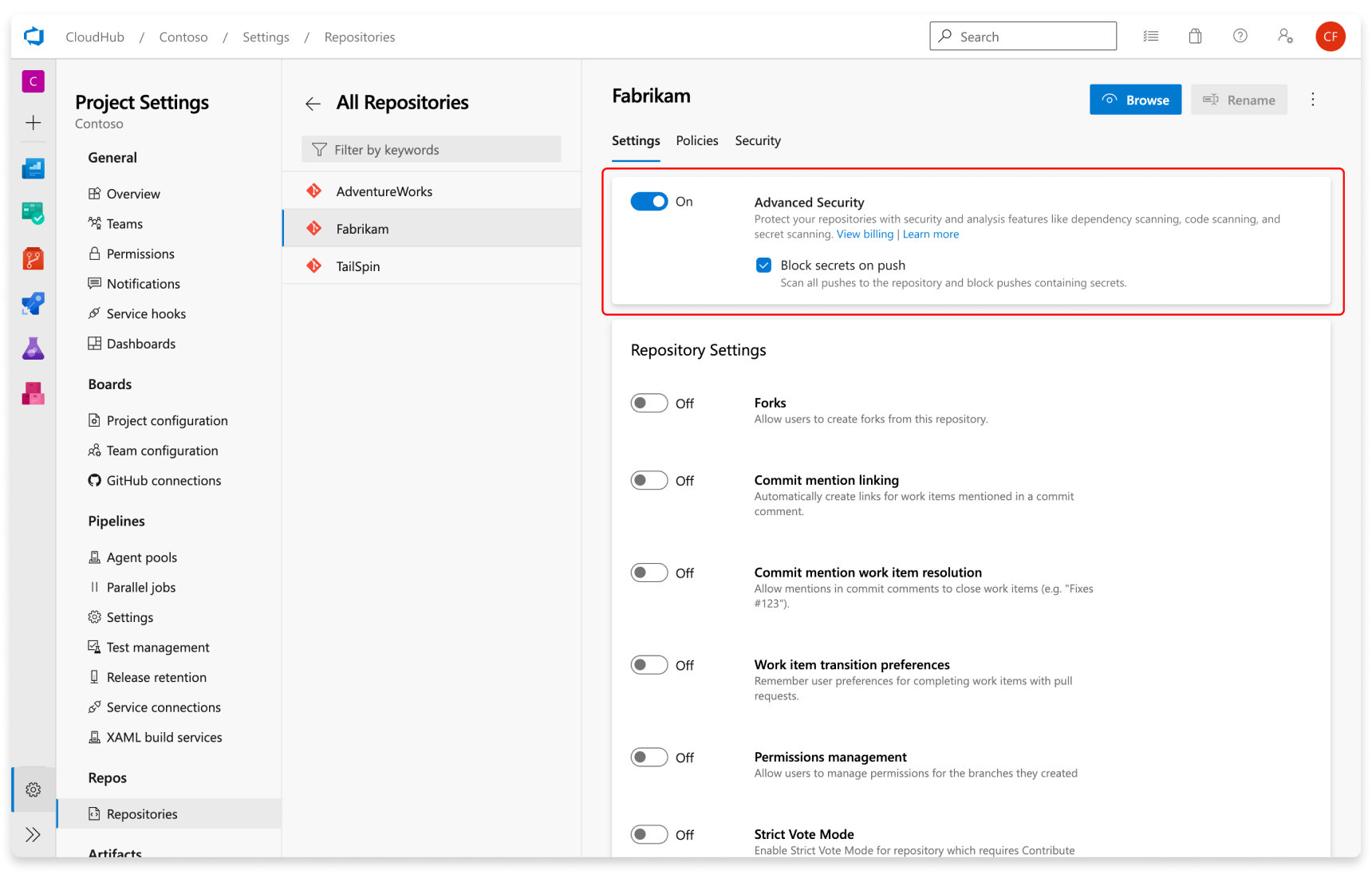
  4. Select Enable and Begin billing to activate Advanced Security. A shield icon now appears in the repository view for any repository with Advanced Security enabled.


Setup Secret Scanning
Secret scanning push protection and repository scanning are automatically enabled when you turn on Advanced Security. You can enable or disable secret push protection from the repository settings page.

Screenshot of enabling push protection.

As mentioned, secret scanning repository scanning is automatically kicked off upon enabling Advanced Security for a selected repository.

How to Configure GitLab Runner with Docker Executor on Ubuntu 24.04 EC2

How to Configure GitLab Runner with Docker Executor on Ubuntu 24.04 EC2 In this tutorial, we will configure a self-hosted GitLab R...