Learn. Build. Secure. Automate. Accelerate with AI. Live Training • Hands-On Labs • Expert Mentorship by Coach AK Contact: +1 (469) 733-5248 | devops.coaching@gmail.com
Free live webinar • November 21, 2026 • 9:30 AM CST Register free →
★2017–2027Celebrating Our 10th Year
Transform Your Career. Engineer Your Future.
Build the skills to become an AI-Enabled DevSecOps & Cloud Engineer with 15 weeks of live training, hands-on labs and personal mentorship.
Here are the top 10 DevOps Tools to focus on to put your DevOps learning on a faster track and kick start your career quickly as a successful Cloud engineer or DevOps engineer in about 10 weeks from now.
Finally having some scripting knowledge is also good by learning Python, YAML, Ruby. and also having some Cloud experience on AWS and Azure will be extremely helpful.
(Lot of new topics covered like GitHub Actions, Helm and Monitoring..)
The DevOps requirements in the IT market space is expected to grow by 35% by 2024. Getting a DevOps education now is a great investment into your future, which will pay off very fast!
You are in the right place to kick start your career in DevOps. DevOps is one of the top and hot IT skills right now. Currently almost all the employers are struggling to get right resources in their teams who can do the DevOps and automation work..You could be that person by attending this coaching program.
DevOps Coaching schedule for June 2024 (promotions are available, pls contact Coach AK)
Date
Time
Type
When?
June 1st
11:35 AM CST - 01:30 PM CST on Saturdays 02:00 PM CST - 04:00 PM CST on Sundays
Weekends
Sat/Sundays
June 4th
6:00 to 8:00 PM CST
Weekdays
Tuesdays/Thursdays
DevOps Coaching Highlights:
Comprehensive hands on knowledge on Git, GitHub, Jenkins, Maven, SonarQube, Nexus, Terraform, Ansible, Docker, Kubernetes, Helm, Prometheus, Docker registry, AWS and Azure cloud platform.
To join DevOps Coaching classes, please contact Coach or Sara(Coach AK's assistant) below:
Contact no# : +1 (469)733-5248, +1 (561) 993-0420
WhatsApp #: +1 (469)733-5248, +1 (561) 993-0420
Email id: contact.devopscoaching@gmail.com Contact Name: Coach AK
Once added SonarQube plug-in, click on proceed to Organization..
How to integrate SonarQube with Azure DevOps:
Create Token in SonarQube to authenticate with Azure DevOps
You need to login to SonarQube using your admin password. admin/admin123 and click on Admin on your top side.
Click on My Account, Security.
Under Tokens, Give some value for token name and choose Global analysis token, click on generate Tokens. Copy the token value generated.
Create Service Connections in Azure DevOps
Login to Azure DevOps. Select your project dashboard.
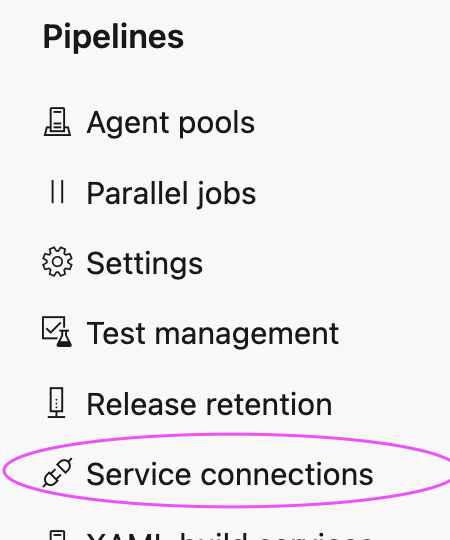
Click on Project settings --> Service connections
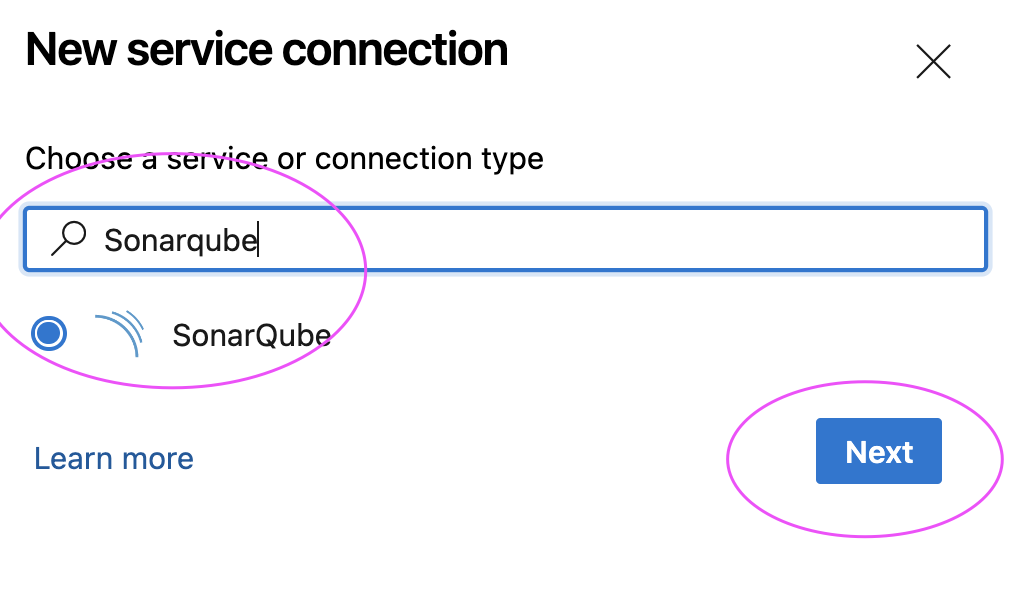
click on New service connection
Type SonarQube and Click Next
Enter SonarQube server url and enter Token created
Give name for service connection and select Grant access permission to all pipelines.
Click on Save.
Create a YAML Pipeline in Azure DevOps
1. Login to Azure DevOps. Go to Azure Pipelines. Click on create a new pipeline, Select GitHub:
2. Select your GitHub repo and select the Maven as YAML pipeline template
3. Click on show assistant on right hand side, type SonarQube and select Prepare Analysis on SonarQube task and then select Service connection from the drop down and choose Integrate with Maven or Gradle option and then click on Add task
Sample Code for entire pipeline is here below
Azure DevOps Pipeline YAML Code:
# Maven
# Build your Java project and run tests with Apache Maven.
# Add steps that analyze code, save build artifacts, deploy, and more:
Terraform is an open source infrastructure as code (IaC) tool developed by HashiCorp. It allows you to define, manage, and provision infrastructure resources in a cloud or on-premises environment using declarative configuration files. Terraform maintains the state of the infrastructure in a state file.
Please find the steps for installing Terraform On Ubuntu 24.0.4 in AWS cloud.