Friday, January 3, 2025

Complete DevSecOps Learning Roadmap for 2026 to become a DevSecOps Engineer | Top DevSecOps Skills for 2026 | Skills required to become a DevSecOps engineer | DevSecOps Learning RoadMap for 2026

 Complete DevSecOps Roadmap


We all know how DevOps is trending right now. And we know where it is going. Let's get to know what skills will make you a successful a DevOps engineer.

Top DevOps skills

1. Linux knowledge and scripting - basic troubleshooting and scripting and looking at the logs

2. Experience in Git, GitHub, GitLab, Bitbucket, Azure Repos or any source code management tools.

3. Experience in CI tools such as Jenkins, GitHub Actions, GitLab CICDAzure DevOps

4. Experience in Code quality tool/security scanning tools - Sonarqube, AquaSec Trivy, Checkov

5. Experience in Infrastructure automation tools such as Terraform, AWS cloud formation

6. Experience in Configuration Management tools such as Ansible, Puppet or Chef

7. Experience in scripting languages such as YAML, groovy, Ruby, Python and Shell

8. Experience in containers such as Docker, Kubernetes and Helm

9. Experience in Monitoring tools such as Prometheus, Grafana

10. Ability to troubleshoot in case builds, deployments failure.

11. Any cloud knowledge and experience - AWS, Azure and Google cloud

Soft skills employers are looking:

These days employers are not only looking for strong technical skills but also looking "soft skills" which are essentials to become successful in IT. If you think if you are lagging on any of these skills, no worries. All these skills can be developed and improved over period of time by practicing.

1. Open minded

2. Willingness to learn new skills

3. Communication

4. Approachable

5. "Get it done" attitude

6. Being adaptable. 

DevSecOps Bootcamp Feb 2025 Schedule | DevOps & AWS Azure Cloud Coaching by Coach AK | DevSecOps and Cloud Computing Online Classes

🚀 Join the Ultimate DevSecOps Bootcamp – February 2025! 🔥

Are you ready to supercharge your career in DevSecOps? Whether you're a beginner or an experienced professional, this hands-on bootcamp will take you from zero to expert with real-world training on the latest DevSecOps tools and practices!

✅ Master Top DevSecOps Tools: Git, GitHub, Bitbucket, Jenkins, SonarQube, Slack, Trivy, Nexus, Terraform, Ansible, Docker, Kubernetes, Helm, Prometheus and more!
✅ Cloud Platforms – AWS & Azure
✅ Live Interactive Sessions – Get personalized guidance from industry experts!
✅ Weekend & Weekday Batches – Flexible schedules to fit your lifestyle!
✅ Weekday Evenings Batch Available! – Perfect for working professionals!
✅ Real-World Projects – Build experience that recruiters love!
✅ 100% Hands-On Training – No boring theory, just practical DevSecOps!
✅ Career Support & Guidance – Resume building, interview prep, and networking!

📅 Weekend Batch Starts: February 22, 2025
🕒 Batch Timings:

  • Weekend Batch: Saturdays (11:35 AM - 01:30 PM CST) & Sundays (12:45 PM - 2:30 PM CST)

📅 Weekday Evening Batch Starts: February 24, 2025
🕒 Batch Timings:

  • Weekday Evenings Batch: Mondays & Wednesdays (6:00 PM - 8:00 PM CST)

📍 Online – Learn from Anywhere!

🎯 Spots are Limited! Secure your seat now and take the first step toward becoming a DevSecOps pro!

📞 Contact Coach AK Now:
📱 +1 (469) 733-5248 (WhatsApp Available)
📧 devops.coaching@gmail.com

💥 Act Fast! Early Bird Discounts Available! 🚀

👉 Register Today by calling  or texting Coach AK on +1 (469) 733-5248

Sunday, December 1, 2024

DevSecOps Bootcamp Feb 2025 Schedule | DevSecOps & AWS Azure Cloud Coaching by Coach AK | DevSecOps and Cloud Computing Online Classes

Lot of new topics covered like GitHub Actions, GitHub Advanced Security, Helm, Prometheus and Grafana..)

The DevOps requirements in the IT market space is expected to grow by 35% by 2024. Getting a DevOps education now is a great investment into your future, which will pay off very fast!

You are in the right place to kick start your career in DevOps. DevOps is one of the top and hot IT skills right now. Currently almost all the employers are struggling to get right resources in their teams who can do the DevOps and automation work..You could be that person by attending this coaching program.

📅 Weekend Batch Starts: February 22, 2025
🕒 Batch Timings:

  • Weekend Batch: Saturdays (11:35 AM - 01:30 PM CST) & Sundays (12:45 PM - 2:30 PM CST)

📅 Weekday Evening Batch Starts: February 24, 2025
🕒 Batch Timings:

  • Weekday Evenings Batch: Mondays & Wednesdays (6:00 PM - 8:00 PM CST)

DevSecOps Coaching Highlights:
Comprehensive hands on knowledge on Git, GitHub, GitHub Actions, Jenkins, Maven, SonarQube, Nexus, Terraform, Ansible, Docker, Kubernetes, Helm, Prometheus, Docker registry, AWS and Azure cloud platform.

To join DevSecOps Coaching classes, please contact Coach AK below:
Contact no# : +1 (469)733-5248
WhatsApp #: +1 (469)733-5248

Email id: devops.coaching@gmail.com
Contact Name: Coach AK


Sunday, November 17, 2024

How to Configure GitHub Advanced Security for Azure DevOps | How to Perform Security scan for Azure Repos using GitHub Advanced Security

GitHub Advanced Security for Azure DevOps brings the secret scanning, dependency scanning and CodeQL code scanning solutions already available for GitHub users and natively integrates them into Azure DevOps to protect your Azure Repos and Pipelines. 


Pre-requisites:

How to Set up dependency scanning?

Dependency scanning is a pipeline-based scanning tool. Results are aggregated per repository. It's recommended that you add the dependency scanning task to all the pipelines you'd like to be scanned.

Add the task Advanced Security Dependency Scanning task (AdvancedSecurity-Dependency-Scanning@1) directly to your YAML pipeline file or select the Advanced Security Dependency Scanning task from the task assistant.

How to Set up code scanning

Code scanning is also a pipeline-based scanning tool where results are aggregated per repository.

Add the tasks in the following order:

  1. Advanced Security Initialize CodeQL (AdvancedSecurity-Codeql-Init@1)
  2. Your custom build steps
  3. Advanced Security Perform CodeQL Analysis (AdvancedSecurity-Codeql-Analyze@1)
Pipeline YAML Code for scanning Java code using GitHub Advanced Security

Create a Pipeline:
Login to your Azure Devops dashboard https://dev.azure.com


Go to Pipelines, Click New, 
select your SCM.


Select your Repository. Use starter pipeline and copy and paste the below code:


trigger:
- main

resources:
- repo: self

variables:
tag: '$(Build.BuildId)'

stages:
- stage: Build
displayName: Build image
jobs:
- job: Build
displayName: Build
pool:
vmImage: ubuntu-latest
steps:
- task: AdvancedSecurity-Codeql-Init@1
inputs:
languages: 'java'
- task: Maven@4
inputs:
mavenPomFile: 'pom.xml'
goals: 'install'
publishJUnitResults: true
testResultsFiles: '**/surefire-reports/TEST-*.xml'
javaHomeOption: 'JDKVersion'
mavenVersionOption: 'Default'
mavenAuthenticateFeed: false
effectivePomSkip: false
sonarQubeRunAnalysis: false
- task: AdvancedSecurity-Dependency-Scanning@1
- task: AdvancedSecurity-Codeql-Analyze@1

Where to see the Scan resule in Azure DevOps?


Monday, November 4, 2024

What is GitHub Advanced Security for Azure DevOps | How to Enable GitHub Advanced Security for Azure DevOps ?

GitHub Advanced Security for Azure DevOps brings the secret scanning, dependency scanning and CodeQL code scanning solutions already available for GitHub users and natively integrates them into Azure DevOps to protect your Azure Repos and Pipelines.


These scanning tools will natively embed automated security checks into the Azure DevOps platform, allowing developers to secure their code, secrets and supply chain without leaving their workflow.

Azure DevOps Advanced Security provides below security features to help organizations identify and address security vulnerabilities in their development processes.

  • Secret Scanning push protection: check if code pushes include commits that expose secrets such as credentials
  • Secret Scanning on repos: scan your repository and look for exposed secrets that were committed accidentally
  • Dependency Scanning – search for known vulnerabilities in open source dependencies (direct and transitive)
  • Code Scanning – use CodeQL static analysis engine to identify code-level application vulnerabilities such as SQL injection and authentication bypass.
Scope of GitHub Advanced Security for Azure DevOps
  • only available for Git repositories
  • only available for Azure DevOps services, not available in Azure DevOps Server(old TFS) 

Pre-requisites:

Enable GitHub Advanced Security
You can enable Advanced Security at the organization, project, or repository level.

Organization-level onboarding
  1. Go to your Organization settings for your Azure DevOps organization.
  2. Select Repositories.
  3. Select Enable all and see an estimate for the number of active committers for your organization appear.
  4. Select Begin billing to activate Advanced Security for every existing repository in each project in your organization.
  5. Optionally, select Automatically enable Advanced Security for new repositories so that any newly created projects have Advanced Security enabled upon creation.

Project-level onboarding

  1. Go to your Project settings for your Azure DevOps project.
  2. Select Repos.
  3. Select the Settings tab.
  4. Select Enable all and see an estimate for the number of active committers for your project appear.
  5. Select Begin billing to activate Advanced Security for every existing repository in your project.
  6. Optionally, select Automatically enable Advanced Security for new repositories so that any newly created repositories have Advanced Security enabled upon creation.
Repository-level onboarding
  1. Go to your Project settings for your Azure DevOps project.
  2. Select Repos > Repositories.
  3. Select the repository you want to enable Advanced Security for.
  4. Select Enable and Begin billing to activate Advanced Security. A shield icon now appears in the repository view for any repository with Advanced Security enabled.


Setup Secret Scanning
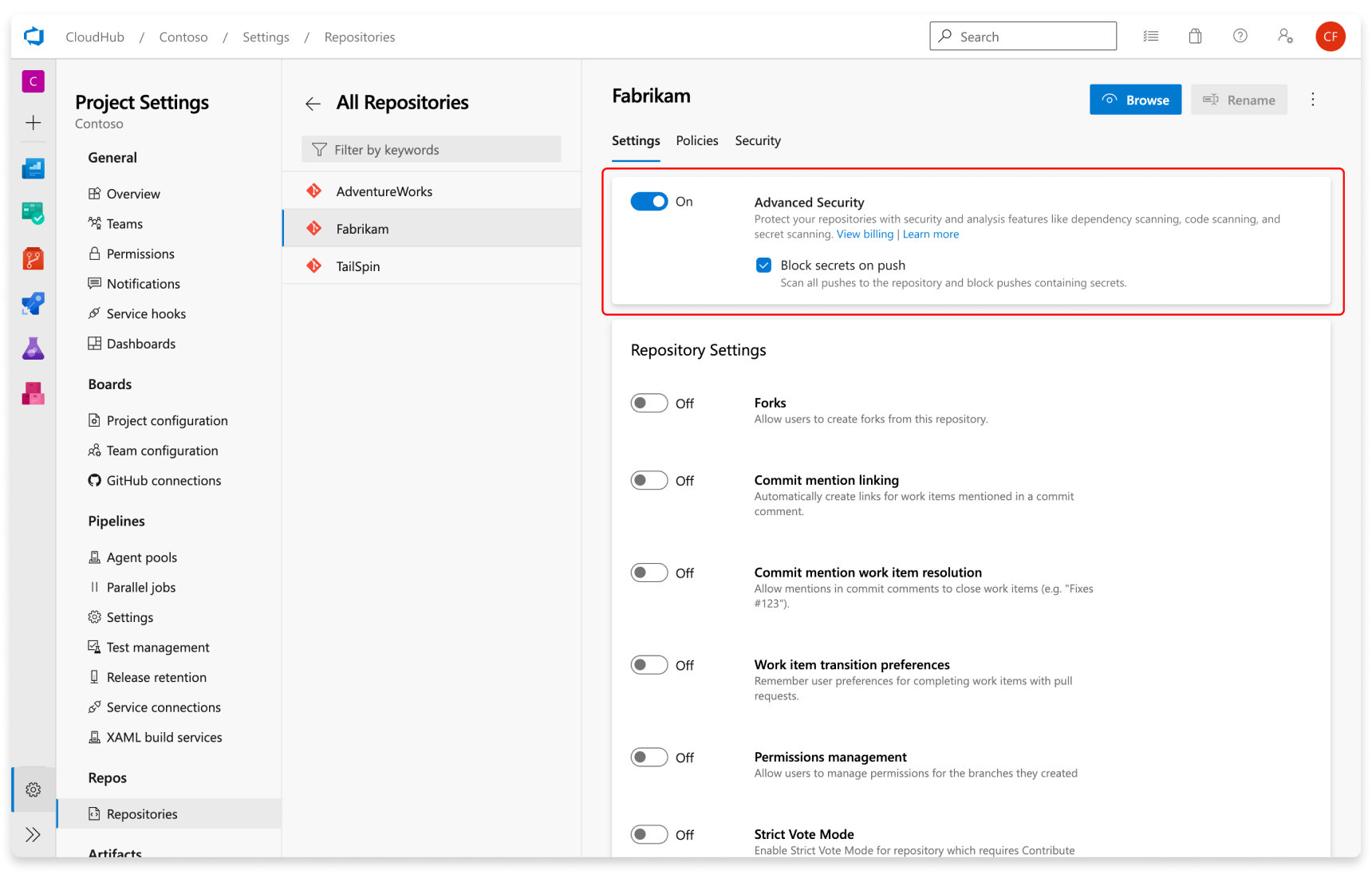
Secret scanning push protection and repository scanning are automatically enabled when you turn on Advanced Security. You can enable or disable secret push protection from the repository settings page.

Screenshot of enabling push protection.

As mentioned, secret scanning repository scanning is automatically kicked off upon enabling Advanced Security for a selected repository.

Friday, November 1, 2024

DevSecOps Bootcamp Dec 2024 Schedule | DevSecOps & AWS Azure Cloud Coaching by Coach AK | DevSecOps and Cloud Computing Online Classes

Lot of new topics covered like GitHub Actions, GitHub Advanced Security, Helm, Prometheus and Grafana..)

The DevOps requirements in the IT market space is expected to grow by 35% by 2024. Getting a DevOps education now is a great investment into your future, which will pay off very fast!

You are in the right place to kick start your career in DevOps. DevOps is one of the top and hot IT skills right now. Currently almost all the employers are struggling to get right resources in their teams who can do the DevOps and automation work..You could be that person by attending this coaching program.

DevOps Coaching schedule - Dec 2024 (promotions are on, please contact Coach AK)

DateTimeTypeWhen?
Dec 1st11:35 AM CST - 01:30 PM CST on Saturdays
01:30 PM CST - 03:30 PM CST on Sundays    
WeekendsSat/Sundays
Dec 3rd6:00 to 8:00 PM CSTWeekdaysTuesdays/Thursdays    

DevSecOps Coaching Highlights:
Comprehensive hands on knowledge on Git, GitHub, Jenkins, Maven, SonarQube, Nexus, Terraform, Ansible, Docker, Kubernetes, Helm, Prometheus, Docker registry, AWS and Azure cloud platform.

To join DevOps Coaching classes, please contact Coach AK below:
Contact no# : +1 (469)733-5248
WhatsApp #: +1 (469)733-5248

Email id: contact.devopscoaching@gmail.com
Contact Name: Coach AK


How to Provision Ubuntu 24.0.4 EC2 Instance | How to create EC2 instance in AWS console | Launch Ubuntu 24.0.4 instance in AWS

How to create new EC2 instance in AWS console using new UI experience? What is EC2 instance?  It is virtual server provided by AWS. We will ...