Amazon Elastic Container Registry (ECR) is a fully managed Docker container registry that makes it easy to store, share, and deploy container images. We
will learn how to build docker image for a springboot microservices app
using Azure DevOps(ADO) build pipeline and push docker image into AWS
ECR.
What are we going to do in this lab?
1. Create a Repository in AWS ECR for storing docker images
2. Create an IAM user and AmazonEC2ContainerRegistryFullAccess policy.
3. Create access keys for IAM user in AWS console
4. Create service connection in AzureDevOps to connect to AWS using IAM user
access & secret keys.
5. Create Azure DevOps Build pipeline with below tasks:
maven build for building JAR
build docker image
push docker image into ECR
6. Verify if docker image has been pushed to AWS ECR
Pre-requisites:
Azure DevOps Account setup and project is created in ADO
Let's say you have configured a build job in Jenkins to implement CI and you are performing code scan using SonarQube. Code scan results shown some defects(bugs) in your Java Code.
If you look at Jenkins console output, you can see analysis was successful.
If you look at SonarQube project dashboard, you are seeing defects like shown below. How do fix those defects? Let's see the steps to fix those defects.
Pre-requisites:
Sonarqube is setup and running
Jenkins is up and running
Java WebApp setup in GitHub
build job configured in Jenkins to perform code scan
Now login to SonarQube
Click on Project name MyWebApp
Click on Overall code, click on 3 Bugs
Now this shows what is the issue with code. it needs <!DOCTYPE> declaration before <html> tag
Click on Why this an issue to learn more about the issue and how you can fix it.
Now code to GitHub where Java WebApp is configured, edit the index.jsp under MyWebApp/src/main/webapp
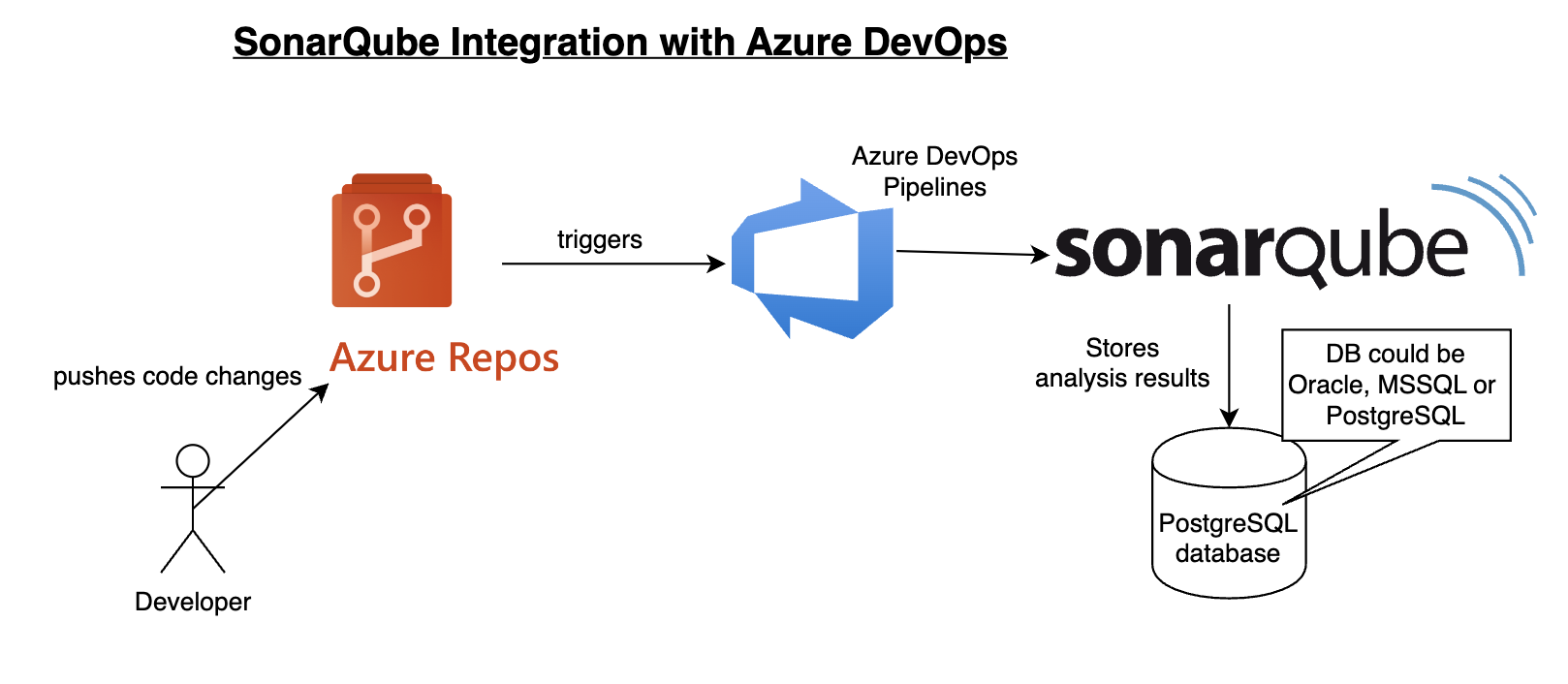
SonarQube is one of the popular static code analysis tools. SonarQube enables developers to write cleaner, safer code. SonarQube is open-source, Java based tool. SonarQube uses database for storing analysis results. Database can be MS SQL, Oracle or PostgreSQL. We will use PostgreSQL as it is open source as well.
SonarQube Architecture:
SonarQube have three components namely
1. Scanner - This contains scanner and analyser to scan application code.
2. SonarQube server - contains Webserver(UI) and search server
3. DB server - used for storing the analysis reports.
Watch steps in YouTube channel:
Please find steps for installing SonarQube on Ubuntu 24.0.4 in Azure Cloud. Make sure port 9000 is opened in firewall rules.
Click here to learn How to setup Virtual Machine in Azure cloud.
How to open port 9000 in Azure VM?
1. Select VM, under Settings--> choose Network
2. Click on Add inbound security role
3. Make sure you add entries like below: 9000 as Destination port ranges TCP as protocol 310 as priority number port_9000 as Name
4. Click on Add, once you add it should be like below:
Pre-requisites:
Instance should have at least 4 GB RAM. Make sure port 9000 is opened as port 9000 is default port for SonarQube.
Make sure below is taken care off.
Login to instance where you will be installing SonarQube, perform the below command:
sudo vi /etc/sysctl.conf
Add the following lines to the bottom of that file:
vm.max_map_count=262144 fs.file-max=65536
To make sure changes are getting into effect:
sudo sysctl -p
Change Host Name to SonarQube sudo hostnamectl set-hostname SonarQube
Perform System update
sudo apt update
Install Docker-Compose
sudo apt install docker-compose -y
Create docker-compose.yml
this yml has all configuration for installing both SonarQube and Postgresql:
sudo vi docker-compose.yml
(Copy the entire content high lighted below in yellow color)
The DevOps requirements in the IT market space is expected to grow by 35%
by 2024. Getting a DevOps education now is a great investment into your
future, which will pay off very fast!
Are you in IT? Tired of your work? Are you not able to make any good
progress in your career?
Are you not having a job? Looking for a break in IT? Are you interested in learning DevOps?
Did you get laid off from your previous job due to Covid-19?
You are in the right place to kick start your career in
DevOps. DevOps is one of the top and hot IT skills right now. Currently almost all the employers are struggling to get
right resources in their teams who can do the DevOps and automation
work..You could be that person by attending this coaching
program.
DevOps Coaching Classes schedules for Dec 2023:
Date
Time
Type
When?
Dec 20th
6:00 to 8:00 PM CST
Weekdays
Mondays/Wednesdays
Dec 9th
09:45 AM CST to 11:35 AM on Saturdays 10:30 AM CST to 12:30 PM CST on Sundays
Weekends
Sat/Sundays
DevOps Coaching Highlights:
- Comprehensive hands on knowledge on Git, Jenkins, Maven, SonarQube,
Nexus, Terraform, Ansible, Docker, Kubernetes, Helm, AWS IAM, ECR, Docker
registry, AWS and Azure cloud platforms. - Coach is having about 23+ yrs of professional IT experience, 8+ Yrs
in DevOps/Cloud/Automation. - Many students already got placed in reputed companies from this
coaching program successfully. - Working as a Sr.DevOps Coach/Architect in a one of the top IT
services companies in USA. - Unique program...less theory, more hands on lab exercises.
- Resume preparation will be done with candidates personally. - One-to-one Interview coaching. - Coaching is purely hands on with 101% job relevant. - 100% Job assistance. - Coached about 1700+ students successfully for past five years and many of my students got placed with many large enterprises in
DFW, Charlotte, Houston, Austin, Chicago, Florida, Seattle, Bay area, Ohio,
NJ and NY areas..
To join coaching classes, please contact Coach AK below through
email or phone number: