Friday, August 11, 2023

How to secure Azure DevOps Pipelines | Azure DevOps Build Pipelines Best Practices | Best practices for securing Azure DevOps Pipelines

Securing your Azure DevOps pipelines is crucial to protect your code, data, and infrastructure. Here are several best practices to consider for securing your Azure DevOps pipelines:

1. Pipeline Security:

  • Use Version Control: Store your pipeline definitions and code in version control repositories. This ensures version history, change tracking, and controlled access.
  • Secure Branch Policies: Implement branch policies to control who can make changes to specific branches. This prevents unauthorized or unreviewed changes from being deployed.
  • Use Parameterized Builds: Avoid hardcoding sensitive information like credentials directly into pipeline definitions. Use pipeline variables or parameterized builds instead.
  • Limit Access: Follow the principle of least privilege. Only grant necessary permissions to users and groups. Use role-based access control (RBAC) to manage access to pipelines and resources.
  • Monitor and Audit: Regularly review access logs, audit logs, and pipeline run history to identify suspicious activities.

2. Secrets Management:

  • Use Variable Groups: Azure DevOps provides variable groups that allow you to store sensitive information securely. These can be linked to pipelines without exposing the values directly in pipeline definitions.
  • Use Secure File Variables: For sensitive files, use secure file variables to securely store and manage encrypted files that your pipelines can use during execution.
  • Azure Key Vault Integration: Integrate Azure Key Vault to store and manage secrets, keys, and certificates. You can then reference these secrets in your pipelines securely.

3. Secure Pipeline Code:

  • Use Private Repositories: Store sensitive code in private repositories. Avoid exposing secrets in public repositories.
  • Encryption: Encrypt sensitive data at rest and during transmission. Use HTTPS for repository connections and secure protocols for data storage.
  • Secure Code Review: Implement code review processes to catch and address security issues in pipeline definitions.

4. Secure Pipeline Execution:

  • Agent Security: Secure the build and deployment agents by regularly updating them, applying security patches, and using agents in private networks when possible.
  • Use Service Principals: If your pipeline needs access to Azure resources, use service principals with the least privilege required. Avoid using personal credentials.
  • Secure Pipeline Variables: When using pipeline variables, ensure that they are set to "Secret" to hide their values in logs and run history.

5. Compliance:

  • Regulatory Compliance: If your organization needs to adhere to specific regulatory standards, ensure that your pipelines and processes align with those standards.
  • Compliance Scanning: Use security and compliance scanning tools to identify vulnerabilities in your pipeline code and configurations.

6. Continuous Improvement:

  • Stay Updated: Regularly review Azure DevOps documentation, security best practices, and new features to stay informed about security improvements.
  • Incident Response Plan: Develop an incident response plan to handle security breaches or unauthorized access.

By following these best practices, you can significantly enhance the security of your Azure DevOps pipelines and safeguard your development and deployment processes. Remember that security is an ongoing effort, and it's important to regularly assess and update your security measures as needed.


Click here to know the CICD process flow digram using Azure DevOps.

Sunday, August 6, 2023

How to install Terraform on RedHat Linux OS | Install Terraform on CentOS/Red Hat Linux(RHEL) | TerraForm Installation on Linux


Terraform is an open source infrastructure as code (IaC) tool developed by HashiCorp. It allows you to define, manage, and provision infrastructure resources in a cloud or on-premises environment using declarative configuration files. Terraform maintains the state of the infrastructure in a state file. 

Please find the steps for installing Terraform On Red Hat Enterprise Linux or CentOS in AWS cloud.

Pre-requisites:

Red Hat EC2 instance is already up and running

Go to HashiCorp Website

Copy steps for Linux under CentOS/RHEL


sudo yum install -y yum-utils
sudo yum-config-manager --add-repo https://rpm.releases.hashicorp.com/RHEL/hashicorp.repo
sudo yum -y install terraform

Check Terraform version
terraform -version


this should show version of Terraform. As of Aug 3, 2023 version was
 
Terraform v1.5.4

Please watch the above steps in action below:

Thursday, August 3, 2023

How to provision Red Hat Linux EC2 Instance in AWS | How to create EC2 instance in AWS console | Launch Red Hat Instance in AWS

How to create a Red Hat Linux EC2 instance in AWS console using new UI experience?

What is EC2 instance? 

It is virtual server provided by AWS.  Please follow the below steps to create an Red Hat Linux EC2 instance.

Pre-requisites:

Steps:
1: Login to AWS console by clicking this link -->  https://aws.amazon.com/console/
click on All services, Click on Compute -->  Click on EC2


2. Click on Launch instance


3. Enter Name as EC2 and enter 1 as number of instance


4. Select Red Hat and choose Red Hat Enterprise Linux


5. Enter t2.small as instance type
6. Click on Create new Key Pair


7. Choose the existing key pair if you have one, otherwise create new one, give some name as myJenkinsKey. Make sure you download the key in your local machine. Please do NOT give space or any character while naming the key.


8. Under Network settings, Click Edit


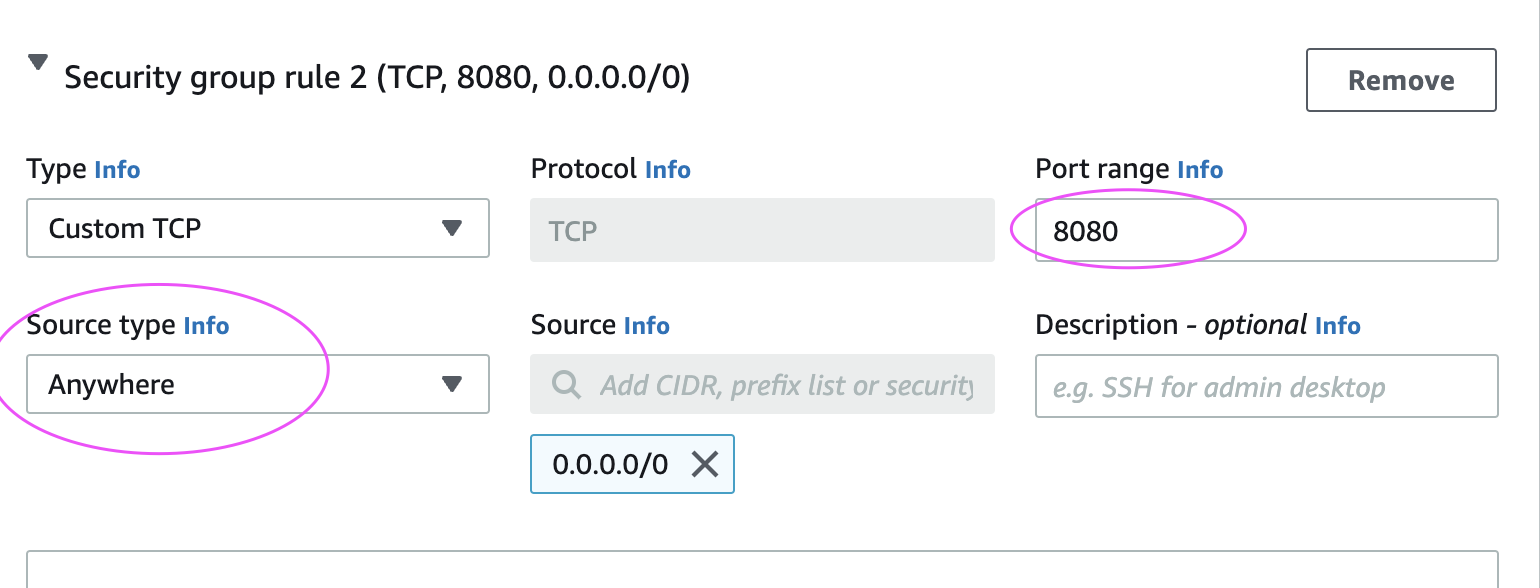
Add port range as 8080 and select AnyWhere as Source Type, that should enter 0.0.0.0/0 as Source

9. Configure Storage
Enter 15 GB as root volume 


And then make sure in Summary, values appear as below:


10. Click on Launch Instance.

Click on View instances

Now you should be able to view instance in AWS console. 

Please follow steps below to connect to EC2 instance from your local machine.

Connect to EC2 instance from local machine:
Please click the below link to understand the steps for connecting to EC2 instance from your local machine - windows or Apple laptop.

http://www.cidevops.com/2018/02/how-to-connect-to-ec2-instance-from.html

Watch Steps in YouTube channel:

How to install Terraform on Linux OS | Install Terraform on Ubuntu 22.0.4 | TerraForm Installation on Linux

Terraform is an open source infrastructure as code (IaC) tool developed by HashiCorp. It allows you to define, manage, and provision infrastructure resources in a cloud or on-premises environment using declarative configuration files. Terraform maintains the state of the infrastructure in a state file. 

Please find the steps for installing Terraform On Ubuntu 22.0.4 in AWS cloud.

Pre-requisites:

Go to HashiCorp Website

Copy steps from Linux-> Ubuntu/Debian


wget -O- https://apt.releases.hashicorp.com/gpg | sudo gpg --dearmor -o /usr/share/keyrings/hashicorp-archive-keyring.gpg

echo "deb [signed-by=/usr/share/keyrings/hashicorp-archive-keyring.gpg] https://apt.releases.hashicorp.com $(lsb_release -cs) main" | sudo tee /etc/apt/sources.list.d/hashicorp.list

sudo apt update && sudo apt install terraform

Check Terraform version
terraform -version

this should show version of Terraform. As of Aug 3, 2023 version was
 
Terraform v1.5.4

Please watch the above steps as Demo in YouTube below: 

Thursday, July 27, 2023

DevOps BootCamp by Coach AK on AWS and Azure Cloud | DevOps and Cloud Computing Online Classes | Jan 2024 Schedule

The DevOps requirements in the IT market space is expected to grow by 35% by 2024. Getting a DevOps education now is a great investment into your future, which will pay off very fast!

You are in the right place to kick start your career in DevOps. DevOps is one of the top and hot IT skills right now. Currently almost all the employers are struggling to get right resources in their teams who can do the DevOps and automation work..You could be that person by attending this coaching program.


DevOps Coaching schedule Jan 2024 (Holidays discount are available, contact Coach AK)
DateTimeTypeWhen?
Jan 8th6:00 to 8:00 PM CSTWeekdaysMondays/Wednesdays    
Jan 20th11:35 AM CST to 1:35 PM CST on Saturdays
02:00 PM CST to 04:00 PM CST on Sundays    
WeekendsSat/Sundays

DevOps Coaching Highlights:

- Comprehensive hands on knowledge on Git, Jenkins, Maven, SonarQube, Nexus, Terraform, Ansible, Docker, Kubernetes, Helm, Prometheus, Docker registry, Helm, AWS and Azure cloud platform.

- Coach is having about 23+ yrs of professional IT experience, 9+ Yrs in DevOps/Cloud computing/Automation.

- Many students already got placed in reputed companies from this coaching program successfully.

- Working as a Sr.DevOps Coach/Architect in a one of the top IT services companies in USA.

- Unique program...less theory, more hands on lab exercises
 
Resume preparation will be done with candidates personally.

One-to-one Interview coaching.

- Coaching is purely hands on with 101% job relevant.

100% Job assistance.

- Coached about 1700+ students successfully for past five years and many of my students got placed with many large enterprises in DFW, Charlotte, Houston, Austin, Chicago, Florida, Seattle, Bay area, Ohio, NJ and NY areas.

To join DevOps Coaching classes, please contact Coach AK below:

Contact no # : +1(469)733-5248
WhatsApp #: +1 (469)733-5248
Email id: devops.coaching@gmail.com
Contact: Coach AK

Tuesday, July 25, 2023

DevOps Interview Preparation Courses Dec Schedule | Please text or WhatsApp Coach AK on +1 (469)733-5248


The DevOps requirements in the IT market space is expected to grow by 35% by 2024. Getting a DevOps education now is a great investment into your future, which will pay off very fast!

Having DevOps skills and knowledge alone will not allow you to land a job, you need to show case you have the practical knowledge with hands on experience and your up to date with current trends.

It is NOT what you do not know, it is what you know and how well you can present them during the interview and work place! you need to have a STORY to tell.

Our Interview Preparation class will enable you to get a job with minimal effort and solid preparation!

Course fee is $299 for new students and $249 for past students.

DevOps Interview preparation schedule for Dec 2023
Date Time Type When?
Dec 9th 09:45 AM CST to 11:30 AM on Saturdays
10:30 AM CST to 12:30 PM CST on Sundays    
Weekends Sat/Sundays

Complete AI-Enabled DevOps Learning Roadmap for 2026 | Skills Required to Become a Modern DevSecOps Engineer

🚀  AI-Enabled DevOps Engineer Roadmap for 2026 The future belongs to AI-Enabled DevOps Engineers, not AI-only Engineers. Strong DevOps fund...