We will learn how to automate Docker builds using Jenkins and Deploy into AWS EKS - Kubernetes Cluster.
We will use Springboot Microservices based Java application. I have already created a repo with source code + Dockerfile. The repo also have Jenkinsfile for automating the following:
- Automating builds using Jenkins
- Automating Docker image creation
- Automating Docker image upload into Docker Hub
- Automating Deployments to Kubernetes Cluster
- Automating Docker image creation
- Automating Docker image upload into Docker Hub
- Automating Deployments to Kubernetes Cluster

Please watch the above steps in YouTube channel:
Pre-requisites:
1. Amazon EKS Cluster is setup and running. Click here to learn how to create Amazon EKS cluster.
1. Amazon EKS Cluster is setup and running. Click here to learn how to create Amazon EKS cluster.
3. Setup Jenkins slave, install docker in it.
4. Docker, Docker pipeline and Kubernetes Deploy plug-ins are installed in Jenkins
4. Docker, Docker pipeline and Kubernetes Deploy plug-ins are installed in Jenkins


6. Install kubectl on your instance
Step #1 -Make sure Jenkins can run Docker builds after validating per pre-requisites
Step #2 - Create Credentials for Docker Hub
Go to Jenkins UI, click on Credentials -->

Click on Global credentials

Now Create an entry for your Docker Hub account. Make sure you enter the ID as dockerhub

Step #3 - Create Credentials for Kubernetes Cluster

Click on Global credentials

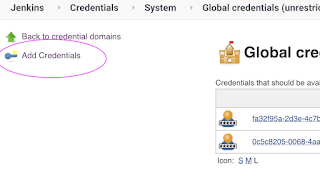
Click on Add Credentials

Now Create an entry for your Docker Hub account. Make sure you enter the ID as dockerhub

Click on Add Credentials, use Kubernetes configuration from drop down.

execute the below command to get kubeconfig info, copy the entire content of the file:
sudo cat ~/.kube/config

Enter ID as K8S and choose enter directly and paste the above file content and save.

Step #4 - set a clusterrole as cluster-admin
By default, clusterrolebinding has system:anonymous set which blocks the cluster access. Execute the following command to set a clusterrole as cluster-admin which will give you the required access.
kubectl create clusterrolebinding cluster-system-anonymous --clusterrole=cluster-admin --user=system:anonymous
Step # 5 - Create a pipeline in Jenkins
Create a new pipeline job.


Step # 6 - Copy the pipeline code from below
Make sure you change red highlighted values below:
Your docker user id should be updated.
your registry credentials ID from Jenkins from step # 1 should be copied
node ("slave") {
def image
def mvnHome = tool 'Maven3'
stage ('checkout') {
checkout([$class: 'GitSCM', branches: [[name: '*/master']], doGenerateSubmoduleConfigurations: false, extensions: [], submoduleCfg: [], userRemoteConfigs: [[credentialsId: '', url: 'https://bitbucket.org/ananthkannan/myawesomeangularapprepo/']]])
}
stage ('Build') {
sh 'mvn -f MyAwesomeApp/pom.xml clean install'
}
stage ('Docker Build') {
// Build and push image with Jenkins' docker-plugin
withDockerRegistry([credentialsId: "dockerhub", url: "https://index.docker.io/v1/"]) {
image = docker.build("akdevopscoaching/mywebapp", "MyAwesomeApp")
image.push()
}
}
stage ('K8S Deploy') {
kubernetesDeploy(
configs: 'MyAwesomeApp/springboot-lb.yaml',
kubeconfigId: 'K8S',
enableConfigSubstitution: true
)
}
}


Make sure you change red highlighted values below:
Your docker user id should be updated.
your registry credentials ID from Jenkins from step # 1 should be copied
node ("slave") {
def image
def mvnHome = tool 'Maven3'
stage ('checkout') {
checkout([$class: 'GitSCM', branches: [[name: '*/master']], doGenerateSubmoduleConfigurations: false, extensions: [], submoduleCfg: [], userRemoteConfigs: [[credentialsId: '', url: 'https://bitbucket.org/ananthkannan/myawesomeangularapprepo/']]])
}
stage ('Build') {
sh 'mvn -f MyAwesomeApp/pom.xml clean install'
}
stage ('Docker Build') {
// Build and push image with Jenkins' docker-plugin
withDockerRegistry([credentialsId: "dockerhub", url: "https://index.docker.io/v1/"]) {
image = docker.build("akdevopscoaching/mywebapp", "MyAwesomeApp")
image.push()
}
}
stage ('K8S Deploy') {
kubernetesDeploy(
configs: 'MyAwesomeApp/springboot-lb.yaml',
kubeconfigId: 'K8S',
enableConfigSubstitution: true
)
}
}
Step # 7 - Build the pipeline
Once you create the pipeline and changes values per your Docker user id and credentials ID, click on

Step # 8 - Verify deployments to K8S
kubectl get pods

kubectl get deployments

kubectl get services


Steps # 9 - Access SpringBoot App in K8S cluster
Once build is successful, go to browser and enter master or worker node public ip address along with port number mentioned above
http://master_or_worker_node_public_ipaddress:port_no_from_above
You should see page like below:


Automating the deployment of Spring Boot microservices to Amazon EKS using Jenkins is a practical way to understand modern DevOps workflows. Integrating Jenkins pipelines with Docker and Kubernetes helps streamline application builds, container image creation, and deployments while reducing repetitive manual tasks. Understanding each stage of this process is valuable for developers who want to build and deploy scalable cloud-based applications.
ReplyDeleteFor developers interested in building full-stack applications with Spring Boot and a modern frontend framework, exploring the Spring Boot ReactJS Full Stack Online Course can complement their backend and deployment knowledge. Combining ReactJS frontend development with Spring Boot microservices provides a foundation for creating end-to-end applications that can later be containerized and deployed to cloud platforms.
Similarly, developers working with newer React-based frameworks can explore the Spring Boot NextJS Full Stack Online Course to understand how frontend and backend technologies fit together in full-stack development. Learning application architecture alongside Docker, Jenkins CI/CD pipelines, and Kubernetes deployment concepts helps connect software development with the practical steps involved in delivering applications to production.
ReplyDelete