Free live webinar • November 21, 2026 • 9:30 AM CST   Register free →
2017–2027Celebrating Our 10th Year

Transform Your Career.
Engineer Your Future.

Build the skills to become an AI-Enabled DevSecOps & Cloud Engineer with 15 weeks of live training, hands-on labs and personal mentorship.

Coach AK in his DevOps learning studio
Coach AK | Ananth KannanSenior DevOps & SRE Architect • Founder, CoachDevOps
3,500+Students Trained
25+ YearsIT Experience
15 WeeksLive Training
70+Hands-on Labs

Master In-Demand Technologies

AWSAzureDockerKubernetesTerraformJenkinsGitHub ActionsAnsibleGitLab

AI-Enabled DevSecOps & Cloud Engineering Bootcamp

Next weekend batch: December 5, 2026
Saturday 9:30–11:30 AM CST • Sunday 10:30 AM–12:30 PM CST

Live classes, practical projects, personal mentorship and career preparation.

View Program Details →

Real Students. Real Success.

Career milestones shared by our students.

✓ Placement in an AI role
“The concepts you taught have improved my technical understanding and confidence.”
ManimaranJuly 2026 Bootcamp
✓ DevSecOps Engineer offer
“I want to sincerely thank you for your mentorship, training, and support.”
Femi AshayeCoachDevOps Alumni
✓ DevOps Engineer offer
“I got an offer for Devops engineer Last week and happy to inform you. I really appreciate you.”
EbenezerCoachDevOps Alumni
View All Success Stories →

Individual student experiences; employment is not guaranteed.

Ready to Take the Next Step?

Explore the program or get answers to your questions before enrolling.

Sunday, October 27, 2024

Deploy Springboot Microservices App into Amazon EKS Cluster using Jenkins Pipeline and Kubectl CLI Plug-in | Containerize Springboot App and Deploy into EKS Cluster using Jenkins Pipeline

 We will learn how to create CICD pipeline to deploy springboot microservices using Jenkins pipeline into EKS Cluster with help of Kubernetes CLI plug-in.

We will use Springboot Microservices based Java application. I have already created a repo with source code + Dockerfile. The repo also have Jenkinsfile for automating the following:

- Automating builds using Jenkins Pipeline
- Automating Docker image creation and tagging
- Automating Docker image upload into AWS ECR
- Automating Docker Containers Deployments to Kubernetes Cluster


Watch steps in YouTube channel:


Same Code for this video is here:

Pre-requisites:
1. Amazon EKS Cluster is setup and running. Click here to learn how to create Amazon EKS cluster.
5. Docker, Docker pipeline and Kubernetes CLI plug-ins are installed in Jenkins

Install Kubernetes CLI plug-in:

6. Install kubectl on your instance

Step # 1 - Create Maven3 variable under Global tool configuration in Jenkins
Make sure you create Maven3 variable under Global tool configuration. 


Step #2 - Create Credentials for connecting to Kubernetes Cluster using kubeconfig
Click on Add Credentials, use Kubernetes configuration from drop down.

use secret file from drop down.


execute the below command to login as jenkins user.
sudo su - jenkins

you should see the nodes running in EKS cluster.

kubectl get nodes


Create namespace to deploy the containers
kubectl create namespace springboot-app-ns
kubectl get ns


Execute the below command to get kubeconfig info, copy the entire content of the file:
cat /var/lib/jenkins/.kube/config


Open your text editor or notepad, copy and paste the entire content and save in a file.
We will upload this file.

Enter ID as K8S and choose File and upload the file and save.


Enter ID as K8S and choose enter directly and paste the above file content and save.

Step # 3 - Create a pipeline in Jenkins
Create a new pipeline job.


Step # 4 - Copy the pipeline code from below
Make sure you change red highlighted values below as per your settings:
Your docker user id should be updated.
your registry credentials ID from Jenkins from step # 1 should be copied

pipeline {
   tools {
        maven 'Maven3'
    }
    agent any
    environment {
        registry = "account_id.dkr.ecr.us-east-1.amazonaws.com/coachak/my-docker-repo"
    }
   
    stages {
        stage('Cloning Git') {
            steps {
                checkout([$class: 'GitSCM', branches: [[name: '*/main']], doGenerateSubmoduleConfigurations: false, extensions: [], submoduleCfg: [], userRemoteConfigs: [[credentialsId: '', url: 'https://github.com/akannan1087/springboot-app']]])     
            }
        }
      stage ('Build') {
          steps {
            sh 'mvn clean install'           
            }
      }
    // Building Docker images
    stage('Building image') {
      steps{
        script {
          dockerImage = docker.build registry 
          dockerImage.tag("$BUILD_NUMBER")
        }
      }
    }
   
    // Uploading Docker images into AWS ECR
    stage('Pushing to ECR') {
     steps{  
         script {
                sh 'aws ecr get-login-password --region us-east-1 | docker login --username AWS --password-stdin account_id.dkr.ecr.us-east-1.amazonaws.com'
                sh 'docker push account_id.dkr.ecr.us-east-1.amazonaws.com/coachak/my-docker-repo:$BUILD_NUMBER'
         }
        }
      }
    // Avoid latest tag image and pass build ID dynamically from Jenkins pipeline
       stage('K8S Deploy') {
        steps{   
            script {
                withKubeConfig([credentialsId: 'K8S', serverUrl: '']) {
                echo "Current build number is: ${env.BUILD_ID}"
               // Replace the placeholders in the deployment.yaml file 
                sh """ 
                sed -i 's/\${BUILD_NUMBER}/${env.BUILD_ID}/g' eks-deploy-k8s.yaml
                """ 
                sh ('kubectl apply -f  eks-deploy-k8s.yaml -n springboot-app-ns')
                }
            }
        }
       }
    }
}

Step # 5 - Build the pipeline
Once you create the pipeline and changes values per your configuration, click on Build now:
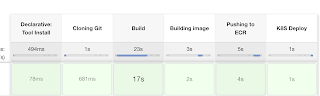

Step # 6 - Verify deployments to K8S

kubectl get deployments -n springboot-app-ns


kubectl get pods -n springboot-app-ns


kubectl get services -n springboot-app-ns


If you see any errors after deploying the pods, you can check the pod logs.
kubectl logs <pod_name> -n spring-app-ns

Steps # 7 - Access SpringBoot App in K8S cluster
Once build is successful, go to browser and enter master or worker node public ip address along with port number mentioned above
http://loadbalancer_ip_address

You should see page like below:


Note:

and make changes in eks-deploy-k8s.yaml to pull Docker image from your AWS ECR repo.

Wednesday, October 2, 2024

DevOps Bootcamp Nov 2024 Schedule | DevOps & AWS Azure Cloud Coaching by Coach AK | DevOps and Cloud Computing Online Classes

 (Lot of new topics covered like GitHub Actions, Helm, Prometheus and Grafana..)

The DevOps requirements in the IT market space is expected to grow by 35% by 2024. Getting a DevOps education now is a great investment into your future, which will pay off very fast!

You are in the right place to kick start your career in DevOps. DevOps is one of the top and hot IT skills right now. Currently almost all the employers are struggling to get right resources in their teams who can do the DevOps and automation work..You could be that person by attending this coaching program.

DevOps Coaching schedule - Nov 2024 (promotions are on, please contact Coach AK)

DateTimeTypeWhen?
Nov 2nd11:35 AM CST - 01:30 PM CST on Saturdays
01:30 PM CST - 03:30 PM CST on Sundays    
WeekendsSat/Sundays
Nov 5th6:00 to 8:00 PM CSTWeekdaysTuesdays/Thursdays    

DevOps Coaching Highlights:
Comprehensive hands on knowledge on Git, GitHub, Jenkins, Maven, SonarQube, Nexus, Terraform, Ansible, Docker, Kubernetes, Helm, Prometheus, Docker registry, AWS and Azure cloud platform.

To join DevOps Coaching classes, please contact Coach AK below:
Contact no# : +1 (469)733-5248, +1 (561) 993-0420
WhatsApp #: +1 (469)733-5248, +1 (561) 993-0420

Email id: contact.devopscoaching@gmail.com
Contact Name: Coach AK


Friday, September 13, 2024

Install Azure CLI in Windows | How to setup Azure CLI in Windows Laptop | How to Install Azure CLI in Windows Machine

The Azure command-line interface (Azure CLI) is a set of commands used to create and manage Azure resources. The Azure CLI is available across Azure services and is designed to get you working quickly with Azure, with an emphasis on automation. Azure CLI is Microsoft's cross-platform command-line experience for managing Azure resources.

Azure CLI can be installed in Windows using MSI or Zip distributions:

Download and install the latest release of the Azure CLI. When the installer asks if it can make changes to your computer, select the "Yes" box.

Or you can also try installing using zip as well.

Zip distributions:

https://aka.ms/installazurecliwindowszipx64

To check the version of Azure CLI

az version

Run the Azure CLI with the az command. To sign in, use the az login command.

az login

DevSecOps Bootcamp Nov 2024 Schedule | DevOps & AWS Azure Cloud Coaching by Coach AK | DevOps and Cloud Computing Online Classes

 (Lot of new topics covered like GitHub Actions, Helm and Monitoring..)

The DevOps requirements in the IT market space is expected to grow by 35% by 2024. Getting a DevOps education now is a great investment into your future, which will pay off very fast!

You are in the right place to kick start your career in DevOps. DevOps is one of the top and hot IT skills right now. Currently almost all the employers are struggling to get right resources in their teams who can do the DevOps and automation work..You could be that person by attending this coaching program.

DevOps Coaching schedule - Nov 2024 (promotions are on, please contact Coach AK)

DateTimeTypeWhen?
Nov 9th11:35 AM CST - 01:30 PM CST on Saturdays
01:30 PM CST - 03:30 PM CST on Sundays    
WeekendsSat/Sundays
Nov 5th6:00 to 8:00 PM CSTWeekdaysTuesdays/Thursdays    

DevOps Coaching Highlights:
Comprehensive hands on knowledge on Git, GitHub, Jenkins, Maven, SonarQube, Nexus, Terraform, Ansible, Docker, Kubernetes, Helm, Prometheus, Docker registry, AWS and Azure cloud platform.

To join DevOps Coaching classes, please contact Coach AK below:
Contact no# : +1 (469)733-5248, +1 (561) 993-0420
WhatsApp #: +1 (469)733-5248, +1 (561) 993-0420

Email id: contact.devopscoaching@gmail.com
Contact Name: Coach AK