Showing posts sorted by relevance for query docker artifactory. Sort by date Show all posts

Monday, February 3, 2020

Setup Artifactory on Ubuntu 16.0.4 using Docker - Install JFrog Artifactory on Ubuntu

Artifactory is one of the popular Binary repository manager. It is Java based tool, used for storing artifacts. Artifactory can be integrated with many Continuous integration and Continuous delivery tools. Artifactory is mainly used by Ant, Maven and Gradle build tools.

Let us see how to configure Artifactory on Ubuntu 16.0.4 using Docker. We will configure Artifactory by doing the three steps:

1. Install Docker on Ubuntu 16.0.4
2. Download Artifactory image
3. Spin up a container using the Artifactory image 

1. Install Docker on Ubuntu

Install packages to allow apt to use a repository over HTTPS:

sudo apt -y install apt-transport-https ca-certificates curl software-properties-common

Add Docker’s official GPG key:
curl -fsSL https://download.docker.com/linux/ubuntu/gpg | sudo apt-key add -

Add stable repository:
sudo add-apt-repository "deb [arch=amd64] https://download.docker.com/linux/ubuntu $(lsb_release -cs) stable"

Install Docker CE:
sudo apt update && sudo apt -y install docker-ce

If you would like to use Docker as a non-root user, you should now consider adding your user to the “docker” group with something like:
sudo usermod -aG docker $USER

Run the command below to see a version of docker installed.
docker version
 Client:
 Version:           18.09.6
 API version:       1.39
 Go version:        go1.10.8
 Git commit:        481bc77
 Built:             Sat May  4 02:35:27 2019
 OS/Arch:           linux/amd64
 Experimental:      false

Step 2: Download Artifactory Docker image

There are different editions of JFrog Artifactory available, let us use open source version.

Pull the latest Docker image of JFrog Artifactory.
sudo docker pull docker.bintray.io/jfrog/artifactory-oss:latest

Display docker images
sudo docker images

Step 3: Create Data Directory

Create data directory on host system to ensure data used on container is persistent.
sudo mkdir -p /jfrog/artifactory
sudo chown -R 1030 /jfrog/

Step 4: Start JFrog Artifactory container

To start an Artifactory container, use the command:
sudo docker run --name artifactory -d -p 8081:8081 \
 -v /jfrog/artifactory:/var/opt/jfrog/artifactory \
   docker.bintray.io/jfrog/artifactory-oss:latest
 

Step 5: Run Artifactory as a service

sudo vim /etc/systemd/system/artifactory.service
 
# Copy the below code highlighted in green 
[Unit]
Description=Setup Systemd script for Artifactory Container
After=network.target

[Service]
Restart=always
ExecStartPre=-/usr/bin/docker kill artifactory
ExecStartPre=-/usr/bin/docker rm artifactory
ExecStart=/usr/bin/docker run --name artifactory -p 8081:8081 \
  -v /jfrog/artifactory:/var/opt/jfrog/artifactory \
  docker.bintray.io/jfrog/artifactory-oss:latest
ExecStop=-/usr/bin/docker kill artifactory
ExecStop=-/usr/bin/docker rm artifactory

[Install]
WantedBy=multi-user.target 

Reload Systemd
sudo systemctl daemon-reload

Then start Artifactory container with systemd.
sudo systemctl start artifactory
 
Enable it to start at system boot.
sudo systemctl enable artifactory

Check whether Artifactory is running?
sudo systemctl status artifactory

Step 6: Access Artifactory Web Interface

http://server_url:8081/artifactory

You should see Artifactory welcome page.


Monday, November 16, 2020

Setup JFrog Artifactory on Ubuntu 18.0.4 using Docker | Install JFrog Artifactory on Ubuntu

Artifactory is one of the popular Binary repository manager. It is Java based tool, used for storing artifacts. Artifactory can be integrated with many Continuous integration and Continuous delivery tools. Artifactory is mainly used by Ant, Maven and Gradle build tools.


Let us see how to configure Artifactory on Ubuntu 18.0.4 using Docker. We will configure Artifactory by doing the three steps:

1. Install Docker on Ubuntu 18.0.4
2. Download Artifactory image
3. Spin up a container using the Artifactory image 


Pre-requistes:
Choose at least medium instance type (4GB RAM)
ports 8081 and 8082 needs to be opened.
8081 for Artifactory REST APIs.
8082 for everything else (UI, and all other product’s APIs). 

1. Install Docker on Ubuntu

sudo apt-get update && sudo apt install docker.io -y

If you would like to use Docker as a non-root user, you should now consider adding your user to the “docker” group with something like:
sudo usermod -aG docker $USER
 
Run the command below to see a version of docker installed. 
docker --version

Step 2: Download Artifactory Docker image

There are different editions of JFrog Artifactory available, let us use open source version.

Pull the latest Docker image of JFrog Artifactory.
sudo docker pull docker.bintray.io/jfrog/artifactory-oss:latest

Display docker images
sudo docker images

Step 3: Create Data Directory

Create data directory on host system to ensure data used on container is persistent.
sudo mkdir -p /jfrog/artifactory
sudo chown -R 1030 /jfrog/

Step 4: Start JFrog Artifactory container

To start an Artifactory container, use the command:
sudo docker run --name artifactory -d -p 8081:8081 -p 8082:8082 \
-v /jfrog/artifactory:/var/opt/jfrog/artifactory \
docker.bintray.io/jfrog/artifactory-oss:latest

Step 5: Run Artifactory as a service

sudo vi /etc/systemd/system/artifactory.service
 # Copy the below code highlighted in green 

[Unit]

Description=Setup Systemd script for Artifactory Container

After=network.target


[Service]

Restart=always

ExecStartPre=-/usr/bin/docker kill artifactory

ExecStartPre=-/usr/bin/docker rm artifactory

ExecStart=/usr/bin/docker run --name artifactory -p 8081:8081 -p 8082:8082 \

  -v /jfrog/artifactory:/var/opt/jfrog/artifactory \

  docker.bintray.io/jfrog/artifactory-oss:latest

ExecStop=-/usr/bin/docker kill artifactory

ExecStop=-/usr/bin/docker rm artifactory


[Install]

WantedBy=multi-user.target 


Reload Systemd
sudo systemctl daemon-reload

Then start Artifactory container with systemd.
sudo systemctl start artifactory
Enable it to start at system boot.
sudo systemctl enable artifactory
Check whether Artifactory is running? 
sudo systemctl status artifactory

Step 6: Access Artifactory Web Interface

http://server_url:8081/ 
You should see Artifactory welcome page like below.

Step 7: Login to Artifactory

Login with default username and password which is admin/password


After Login, click on Get started. Now reset admin password. Enter Admin$321/Admin$321

Skip for base URL and skip proxy setup
Click Next

That's it! Artifactory is setup successfully.

Monday, January 30, 2023

Install Artifactory using Docker Compose | Install Artifactory using Docker Compose on Ubuntu 22.0.4 | How to Setup JFrog Artifactory using Docker-Compose

How to setup Artifactory using Docker Compose?

Artifactory is open source, binary repository manager. Artifactory is the single solution for managing all the artifacts, binaries, files and containers throughout your software supply chain. 

Some of the key features of Artifactory:
  • Supports 27 different package types including helm charts, docker images regardless of tech stack.
  • A single source of truth for all your binaries
  • Integration with all CICD tools
  • role based authorization with teams to manage artifacts 
  • you can create local, remote and virtual repositories
What is Docker Compose?
Compose is a tool for defining and running multi-container Docker applications. With Compose, you use a YAML file to configure your application’s services. Then, with a single command, you create and start all the services from your configuration. Since Docker Compose lets you configure related containers in a single YAML file, you get the same Infrastructure-as-Code abilities as Kubernetes. But they come in a simpler system that’s more suited to smaller applications that don’t need Kubernetes’ resiliency and scaling.
 
The purpose of docker-compose is to function as docker cli but to issue multiple commands much more quickly. To make use of docker-compose, you need to encode the commands you were running before into a docker-compose.yml file
 
Run docker-compose up and Compose starts and runs your entire app.

Watch the Steps in YouTube channel:

Pre-requisites:
  • Ubuntu EC2 up and running with at least t2.medium (4GB RAM), 2GB will not work
  • Port 8081, 8082 is opened in security firewall rule
  • instance should have docker-compose installed

Change Host Name to Artifactory
sudo hostnamectl set-hostname Artifactory

Perform System update
sudo apt update

Install Docker-Compose
sudo apt install docker-compose -y

Create docker-compose.yml
this yml has all the configuration for installing Artifactory on Ubuntu EC2.
sudo vi docker-compose.yml 

(Copy the below code high-lighted in yellow color)
version: "3.3"
services:
  artifactory-service:
    image: docker.bintray.io/jfrog/artifactory-oss:7.49.6
    container_name: artifactory
    restart: always
    networks:
      - ci_net
    ports:
      - 8081:8081
      - 8082:8082
    volumes:
      - artifactory:/var/opt/jfrog/artifactory

volumes:
  artifactory:
networks:
  ci_net:

Save the file by entering :wq!

Now execute the compose file using Docker compose command to start Artifactory Container
sudo docker-compose up -d 

-d means detached mode

Make sure Artifactory is up and running
sudo docker-compose logs --follow


Once you see the message, that's it. Artifactory is been setup successfully. Now press Control C and enter to come out of the above screen.

Check Artifactory is up and running by typing below command:
curl localhost:8081
This confirms that Artifactory is up and running locally.

How to access Artifactory in the browser?
Now access Artifactory UI by going to browser and enter public dns name with port 8081
http://change to_artifactory_publicdns_name:8081

default user name is admin
password is password


After Login, click on Get started. 

Now reset admin password. enter new admin password 

Skip for base URL and skip proxy setup
Click Next, click on Finish


How to integrate Artifactory with Jenkins?

How to stop Artifactory container
sudo docker-compose down


Sunday, October 8, 2023

Install JFrog Artifactory on Linux instance | Setup JFrog Artifactory on Ubuntu | Install JFrog Artifactory 7.X on Ubuntu 22.0.4

Artifactory is one of the popular binary repository managers. It is Java based open source tool, used for storing build artifacts and docker images.

Some of the key features of Artifactory:
  • Supports 27 different package types including helm charts, docker images regardless of tech stack.
  • A single source of truth for all your binaries
  • Integration with all CICD tools
  • role based authorization with teams to manage artifacts 
  • you can create local, remote and virtual repositories


Artifactory can be integrated with many Continuous integration and Continuous delivery tools. Artifactory is mainly used by Ant, Maven and Gradle build tools. Let us see how to install Artifactory on Ubuntu 22.0.4 using Deb packages.

Pre-requisites:
  • VM needs to have at least 4GB RAM, for AWS choose at least medium instance type.
  • Default ports 8081 and 8082 needs to be opened. 8081 for Artifactory REST APIs. 8082 for everything else (UI, and all other product’s APIs).
Change Host Name to Artifactory
sudo hostnamectl set-hostname Artifactory

Update Ubuntu OS
sudo apt update

Add JFrog Artifactory APT repository
echo "deb https://releases.jfrog.io/artifactory/artifactory-debs xenial main" | sudo tee -a /etc/apt/sources.list.d/artifactory.list


Import repository GPG key by running the following commands
curl -fsSL  https://releases.jfrog.io/artifactory/api/gpg/key/public|sudo gpg --dearmor -o /etc/apt/trusted.gpg.d/artifactory.gpg

Update the package
sudo apt update

Install Artifactory
sudo apt install jfrog-artifactory-oss -y
The above message should confirm Artifactory have been successfully installed.
Now let us start Artifactory service.

Start Artifactory 
sudo systemctl start artifactory.service
Create symbolic link
sudo systemctl enable artifactory.service


Check whether Artifactory is running?
sudo systemctl status artifactory.service

Press q to quit 

You can also check the logs

sudo tail -f /var/opt/jfrog/artifactory/log/artifactory-service.log


Check if service is running locally on 8081 port

curl localhost:8081

Access Artifactory App
Go to browser and open public IP/DNS name along with port no:8081
http://your_public_dns_name:8081

You should see Artifactory welcome page, login with default username and password which is
admin/password


After Login, click on Get started. 

Now reset admin password. enter as Admin1234/Admin1234

Skip for base URL and skip proxy setup
Click Next, click on Finish


That's it! Artifactory is setup successfully.

How to Integrate Artifactory and Jenkins?
https://www.coachdevops.com/2020/04/integrate-artifactory-with-jenkins.html

You can watch the steps in details on our YouTube channel:
  

Thursday, November 9, 2023

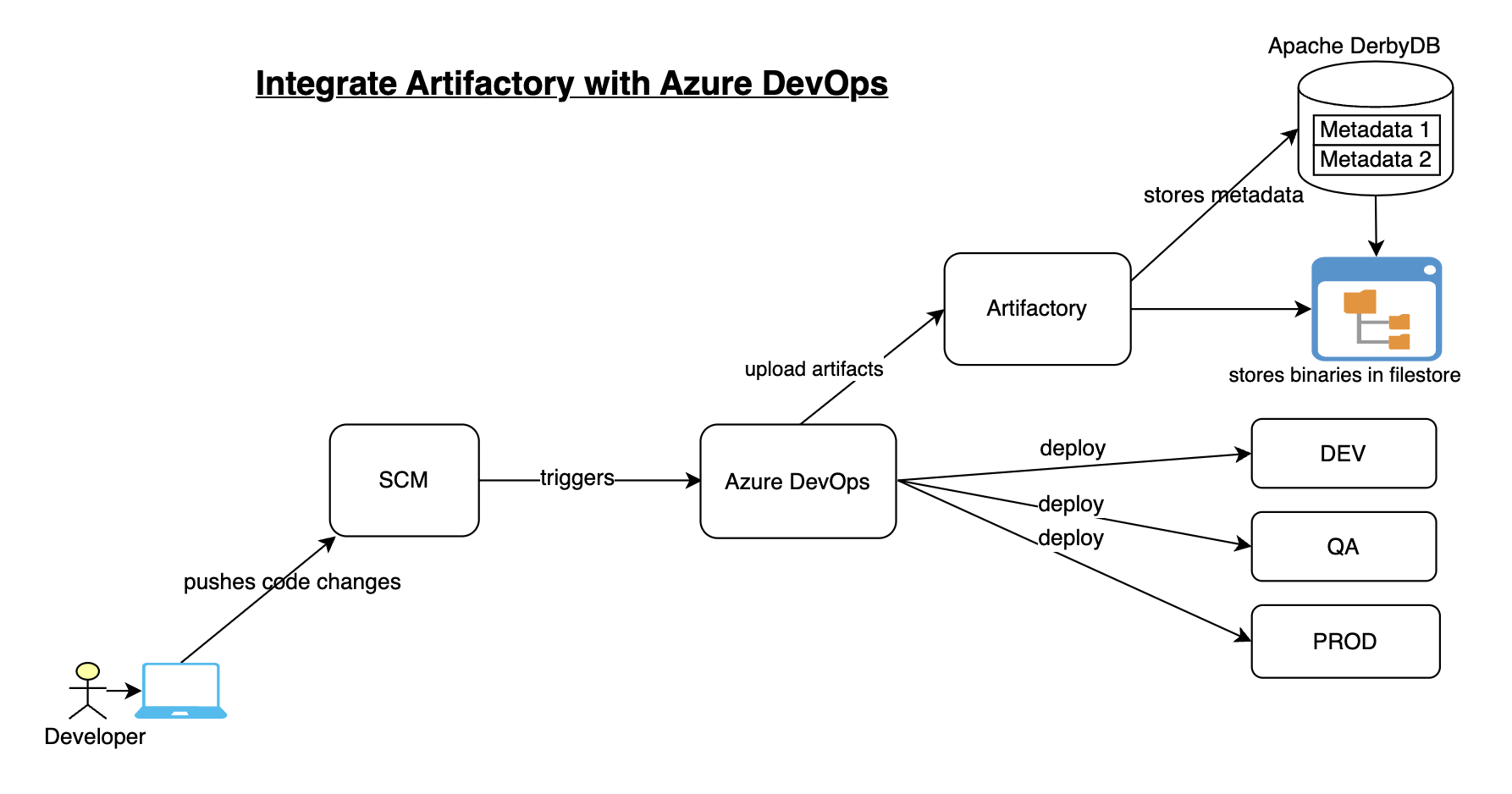
How to Integrate Artifactory with Azure DevOps | Upload Artifacts from Azure DevOps YAML Pipelines to Artifactory | Artifactory and Azure DevOps Integration | Upload Java WAR file into Artifactory from Azure Pipelines

How to integrate Artifactory with Azure DevOps for uploading build artifacts?


Artifactory is one of the popular binary repository managers. It is Java based open source tool, used for storing build artifacts and docker images.

Some of the key features of Artifactory:
  • Supports 27 different package types including helm charts, docker images regardless of tech stack.
  • A single source of truth for all your binaries
  • Integration with all CICD tools
  • role based authorization with teams to manage artifacts 
  • you can create local, remote and virtual repositories
Pre-requisites:

We will automate building a Java project configured in GitHub and we will use Maven to build, package in Azure YAML pipeline and upload WAR file into Artifactory.

Steps to be followed to create a pipeline:

Create a Pipeline:
Login to your Azure Devops dashboard https://dev.azure.com


Go to Pipelines, Click New
select your SCM, in my case, Java Web App code is in GitHub.


Select the Java Repo, select Maven from the option. This will generate YAML file for us.

Add a task for uploading WAR file.
Click on Show assistant, search for generic and select JFrog Generic Artifacts


Choose Upload as command, choose service connection for Artifactory, enter *.war as pattern, enter repo name where artifact will be uploaded. Click on Add.


Now save the pipeline.. Run the pipeline

Azure DevOps YAML Pipeline Code

using the pipeline code we can automate build using Maven and upload WAR file into Artifactory

# Build your Java project using Maven and Upload WAR file to Artifactory

trigger:
- main
pool:
vmImage: ubuntu-latest
steps:
- task: Maven@3
inputs:
mavenPomFile: 'MyWebApp/pom.xml'
mavenOptions: '-Xmx3072m'
javaHomeOption: 'JDKVersion'
jdkVersionOption: '1.8'
jdkArchitectureOption: 'x64'
publishJUnitResults: true
testResultsFiles: '**/surefire-reports/TEST-*.xml'
goals: 'package'
- task: JFrogGenericArtifacts@1
inputs:
command: 'Upload'
connection: 'Artifactory_svc_conn'
specSource: 'taskConfiguration'
fileSpec: |
{
"files": [
{
"pattern": "*.war",
"target": "libs-snapshot-local"
}
]
}
failNoOp: true

Now login to Artifactory..Click on Artifactory --> Artifacts. We can see the WAR file being uploaded.


This is how we can easily integrate Artifactory with Azure DevOps for uploading build artifacts.

Watch Steps in YouTube channel:

Tuesday, August 3, 2021

Master DevSecOps Coaching Program Model Information | AWS Cloud, Azure Cloud and DevSecOps Coaching Program Model Information

(More New Topics..New tools added such as GitHub Actions, Helm, GitHub Advanced Security and Trivy Scanner, CheckOv IAC security scan tools included)

    About Coach Ananth(or known as Coach AK):

    • 🎓 TOGAF-Certified Architect with 24 years of IT experience, including 10+ years in DevOps and Cloud Computing.
    • 🛠 Expertise in DevOps Tools: Git, BitBucket, GitHub, Jenkins, Maven, SonarQube, Nexus, Artifactory, Slack, Terraform, Ansible, Docker, Helm, Prometheus, and Kubernetes on AWS and Azure platforms.
    • 🚀 Proven Success: Coached over 3000 professionals, with many placed in top-tier companies.
    • 📚 Unique Learning Model: Minimal theory, maximum hands-on labs, focusing on job-relevant skills.
    • 🌐 Comprehensive Cloud Training: Master AWS and Azure through a practical, immersive experience.
    • ✍️ Personalized Support: Includes resume preparation and one-on-one interview coaching to help candidates stand out.
    • 🎉 Milestone Achieved: Celebrating 9 years of coaching anniversary in August 2026.
    • 🤝 Learn from the Best: Led by a Senior DevOps Coach/Architect currently working with a leading IT services company in the U.S.

    Here is the coaching model:

    • 🚀 12-Week Hands-On DevSecOps Coaching: Gain real-world experience with AWS and Azure cloud platforms.
    • 🔧 80% Practical, 20% Theory: Over 50 lab exercises ensure you learn by doing.
    • 💻 Comprehensive Tool Coverage: Master Git, GitHub, Jenkins, Maven, SonarQube, Nexus, Terraform, Ansible, Docker, Kubernetes, Helm, Prometheus, and more.
    • 👨‍🏫 Expert-Led Training: Learn from Coach AK, a TOGAF-certified architect with 24+ years of IT experience.
    • 🤝 Collaborative Learning: Get access to WhatsApp groups for troubleshooting, discussions, and peer support.
    • 📄 Resume & Interview Support: Tailored guidance to make your job applications stand out.
    • ✅ Proven Success: Join over 3,000 professionals who’ve advanced their careers with our program.
    • 🌟 Flexible Learning Options: Designed to fit your schedule and career goals.
    • 💡 Transform Your Career: Believe in yourself—anything is possible!

    📈 Why Join This Bootcamp?

         ✅ Hands-on Training – Work on real-world projects
         ✅ Learn Top Security Tools – SonarQube, Aqua Trivy, Checkov, GitHub Advanced Security
         ✅ Expert-Led Live Sessions – Interactive & practical guidance
         ✅ Career Support – Resume tips, interview prep & certification guidance
         ✅ Project-Based Learning – Apply skills in real DevOps environments

    Useful Links:
      • Click here for the coaching schedule
      • Click here to know more about the program
      • Click here to know about the facts about the program
      Just believe!! Anything is possible!!

      Tuesday, March 31, 2026

      AI-Enabled DevSecOps & Cloud Engineering Bootcamp | Coach AK's Master DevSecOps Bootcamp Program Model Information | AWS Cloud and Azure Cloud DevOps Coaching Program Model Information

      Why This Bootcamp Is Different in 2026

      Learning tools alone is no longer enough.

      Modern DevOps Engineers are expected to:

      ✅ Build CI/CD pipelines
      ✅ Secure software supply chains
      ✅ Manage Kubernetes platforms
      ✅ Automate cloud infrastructure
      ✅ Use AI to troubleshoot, document and accelerate delivery

      In this bootcamp you will learn the traditional DevSecOps skills that employers expect, plus how to use AI responsibly to become a more productive DevOps, Cloud, Platform or SRE Engineer.

      You will learn both:

      1. How the technology works

      2. How AI helps you work faster and smarter


        About Coach Ananth(or known as Coach AK):

        • 🎓 TOGAF-Certified Architect with 24 years of IT experience, including 10+ years in DevOps and Cloud Computing.
        • 🛠 Expertise in DevOps Tools: Git, BitBucket, GitHub, GitLab CICD, Jenkins, Maven, SonarQube, Nexus, Artifactory, Slack, Terraform, Ansible, Docker, Helm, Prometheus, and Kubernetes on AWS and Azure platforms.
        • 🚀 Proven Success: Coached over 3000 professionals, with many placed in top-tier companies.
        • 📚 Unique Learning Model: Minimal theory, maximum hands-on labs, focusing on job-relevant skills.
        • 🌐 Comprehensive Cloud Training: Master AWS and Azure through a practical, immersive experience.
        • ✍️ Personalized Support: Includes resume preparation and one-on-one interview coaching to help candidates stand out.
        • 🎉 Milestone Achieved: Celebrating 8 years of successful coaching in August 2025.
        • 🤝 Learn from the Best: Led by a Senior DevOps Coach/Architect currently working with a leading IT services company in the U.S.

        Here is the coaching model:

        • 🚀 12-Week Hands-On DevSecOps Coaching: Gain real-world experience with AWS and Azure cloud platforms.
        • 🔧 80% Practical, 20% Theory: Over 50 lab exercises ensure you learn by doing.
        • 💻 Comprehensive Tool Coverage: Master Git, GitHub, Github Actions, GitLab CICD, Jenkins, Maven, SonarQube, Nexus, Terraform, Ansible, Docker, Kubernetes, Helm, Prometheus, and more.
        • 👨‍🏫 Expert-Led Training: Learn from Coach AK, a TOGAF-certified architect with 24+ years of IT experience.
        • 🤝 Collaborative Learning: Get access to WhatsApp groups for troubleshooting, discussions, and peer support.
        • 📄 Resume & Interview Support: Tailored guidance to make your job applications stand out.
        • ✅ Proven Success: Join over 3,000 professionals who’ve advanced their careers with our program.
        • 🌟 Flexible Learning Options: Designed to fit your schedule and career goals.
        • 💡 Transform Your Career: Believe in yourself—anything is possible!

        📈 Why Join This Bootcamp?

             ✅ Hands-on Training – Work on real-world projects
             ✅ Learn Top Security Tools – SonarQube, Aqua Trivy, Checkov, GitHub Advanced Security
             ✅ Expert-Led Live Sessions – Interactive & practical guidance
             ✅ Career Support – Resume tips, interview prep & certification guidance
             ✅ Project-Based Learning – Apply skills in real DevOps environments

        Useful Links:
          • Click here for the coaching schedule
          • Click here to know more about the program
          • Click here to know about the facts about the program
          Just believe!! Anything is possible!!

          Watch more about coaching model:


              Tuesday, October 14, 2025

              AI-Enabled DevSecOps BootCamp FAQs | AI Enabled DevSecOps and Multi Cloud computing FAQs by Coach AK

              Frequently Asked Questions (FAQs) - AI-Enabled DevSecOps & Cloud Engineering Bootcamp

              1. How long is the DevSecOps Coaching Program?

              This is 12 to 14 weeks online coaching program. For detailed curriculum and labs, please click here.

              2. Is this an online or in-person program?

              Classes are currently conducted online via Zoom.

              3. When does the next batch start?

              Please click here for the latest schedule.

              4. Can anyone join this program and become successful?

              Yes. Success depends on your commitment, willingness to learn, and ability to follow the coach's guidance and mentorship throughout the program.

              5. Do I need prior IT or programming experience?

              No prior experience is required. However, basic knowledge of computers, software development, or IT concepts is helpful.

              6. Is this program hands-on?

              Yes. This is a highly practical and lab-oriented coaching program with 50+ hands-on exercises.

              7. Will I receive resume assistance?

              Yes. Resume preparation and review guidance are included.

              8. Will I receive interview preparation support?

              Yes. The coach provides interview guidance, mock questions, preparation materials, and career coaching.

              9. What is the course fee?

              $990 per student for a one-time payment.

              Installment option:
              3 payments of $330 each.

              For pricing in India, please contact the coach.

              10. What payment methods are accepted?

              Zelle, Cash App, and PayPal.

              11. Where will students perform lab exercises?

              Students will use their own laptops and computers and connect to AWS and Azure cloud platforms.

              12. What tools are covered in this program?

              Linux, Git, GitHub, GitHub Actions, GitLab CI/CD, Bitbucket, Jenkins, Maven, SonarQube, Trivy, Checkov, Nexus, Artifactory, Slack, Terraform, Ansible, Docker, Kubernetes, EKS, Helm, Prometheus, Grafana, Azure DevOps, AWS, and Azure.

              13. Who is this program for?

              • Beginners transitioning into DevOps
              • System Administrators
              • Developers
              • QA Engineers
              • Build & Release Engineers
              • Cloud Engineers
              • Experienced DevOps Engineers looking to up skill

              14. Will AI replace DevOps Engineers?

              No. AI will not replace DevOps Engineers. However, DevOps Engineers who effectively use AI will have a significant advantage in the job market.


              AI-Enabled DevOps & DevSecOps FAQs

              15. Is AI included in this bootcamp?

              Yes. Students will learn how AI can be used for CI/CD, Kubernetes, Terraform, DevSecOps, troubleshooting, documentation, and productivity improvements.

              16. Do I need AI experience before joining?

              No. No prior AI knowledge or experience is required.

              17. What AI topics are covered?

              Students will learn:

              • AI-Assisted CI/CD
              • AI-Assisted Kubernetes Operations
              • AI-Assisted Terraform & Infrastructure as Code
              • AI-Assisted DevSecOps
              • AI-Assisted Troubleshooting & RCA
              • Prompt Engineering for DevOps Engineers

              18. Will I build an AI Assistant?

              Yes. Students will build a DevOps AI Assistant capable of generating pipelines, explaining configurations, troubleshooting issues, and assisting with DevOps learning.

              19. What AI tools will be covered?

              ChatGPT, GitHub Copilot, OpenAI APIs, and the CoachDevOps AI Assistant.

              20. How will AI help me as a DevOps Engineer?

              AI can help generate CI/CD pipelines, analyze logs, troubleshoot deployments, review Infrastructure as Code, create documentation, and accelerate Root Cause Analysis (RCA).

              21. Will AI replace traditional DevOps topics in this course?

              No. DevOps and DevSecOps fundamentals remain the primary focus. AI is taught as a productivity accelerator to help engineers work smarter and faster.

              22. Why should I learn AI if I want to become a DevOps Engineer?

              Modern DevOps Engineers are expected to use AI to improve productivity, automate repetitive tasks, troubleshoot faster, and create better documentation. This bootcamp teaches both DevOps fundamentals and practical AI skills that are increasingly used in enterprise environments.

              23. Will I receive lifetime access to the AI Assistant?

              Students will have access to the CoachDevOps AI Assistant during the bootcamp. Additional access options after the course will be announced separately.

              Friday, July 9, 2021

              DevSecOps BootCamp and AWS and Azure Cloud computing Program by Coach AK - FAQs

              (More New Topics..New CICD tool included - GitHub Actions, Trivy, Checkov Security scanner!)

              1. How many weeks is this DevSecOps Coaching program ?

                  12 weeks program, to know more about the program, click here.

              2. It is online or in-person class?

                  Classes are currently online only (on Zoom)

              3. What are the schedules for next batches?

                  Click here for the schedules

              4. Can anyone do this program and become successful? 

                  Yes, Absolutely. Any one can do this program and become successful if the person is willing to put the efforts to learn with open minded-ness and ready to follow coach's direction & mentorship and being committed to this program.

              5. Do I need to have any experience & knowledge in IT or computer programming?

                 Not really, if you have any experience in IT it helps, but it is not mandatory. You can learn basics of Agile or software development life cycle by self learning. 

              6. Is the Coaching program lab oriented?

                 Yes, purely lab oriented coaching

              7. Do I get any help in preparing my resume?

                 Yes, the Coach will assist you in preparing your resume.

              8. Do I get any help or tips in preparing for the DevOps interview?

                 Yes, Coach will provide necessary documents, tips or guidance in preparing for DevOps interview.

              9. What is the course fee ?
                  $990/person if you make a single payment. Please talk to coach for current offers/promotions.
                  for 3 installments you will be paying $330.
               If you live in India, please talk to Coach to get the price in Rs. 

              10. What are the modes of payment?
                   Zelle, Cash App or PayPal

              11. Where will students do the lab exercises?
                     You will be learning DevOps, Cloud computing on AWS and Azure Cloud platforms. 

              12. What are the different tools covered in this program?
                • Linux basics
                • Git
                • GitHub
                • GitHub Actions
                • BitBucket
                • Jenkins
                • Maven
                • SonarQube
                • Trivy security scanner 
                • Checkov IAC scanner
                • Nexus
                • Artifactory 
                • Slack
                • Terraform
                • Ansible
                • Docker
                • Kubernetes
                • EKS
                • Helm
                • Prometheus
                • Grafana
                • Azure DevOps
                • AWS Cloud
                • Azure Cloud
              13. Who are the targeted Audience for this Course?
              • Beginners transitioning into DevOps
              • IT professionals (SysAdmins, Developers, QA Engineers, Build and release engineers)
              • Experienced DevOps engineers looking to up skillclick here.

              Complete AI-Enabled DevOps Learning Roadmap for 2026 | Skills Required to Become a Modern DevSecOps Engineer

              🚀  AI-Enabled DevOps Engineer Roadmap for 2026 The future belongs to AI-Enabled DevOps Engineers, not AI-only Engineers. Strong DevOps fund...