Let us say you have a source files and you
would like to check-in the source files into GitHub.
How will you do add project/source files from your machine into GitHub?
Pre-requistes:
1. Make sure git is installed on your source machine.
2. Make sure you add SSH public keys to GitHub by executing ssh-keygen command.
1. Create a new repo in GitHub. Do NOT create README file yet.
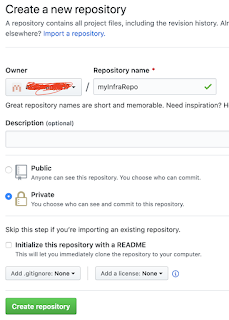
Once you create the repository. it should show something like below:
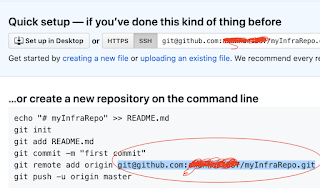
2. Open git bash or command line terminal
3. navigate to your directory where you have source files.
4. run the below command to initialize the directory as local repository.
git init
5. Execute git add .
6. git commit -m "my project setup in GitHub"
7. git remote add origin remote repository URL
(take the remote repo url from above image, marked in red color )
8. git push -u origin master
Now login to GitHub and make sure code is available under source tab for the repo.
How will you do add project/source files from your machine into GitHub?
Pre-requistes:
1. Make sure git is installed on your source machine.
2. Make sure you add SSH public keys to GitHub by executing ssh-keygen command.
1. Create a new repo in GitHub. Do NOT create README file yet.

Once you create the repository. it should show something like below:

2. Open git bash or command line terminal
3. navigate to your directory where you have source files.
4. run the below command to initialize the directory as local repository.
git init
5. Execute git add .
6. git commit -m "my project setup in GitHub"
7. git remote add origin remote repository URL
(take the remote repo url from above image, marked in red color )
8. git push -u origin master
Now login to GitHub and make sure code is available under source tab for the repo.


No comments:
Post a Comment