Terraform is a popular Infrastructure automation tool. You can easily provision EC2 instances or create any resources on AWS or any cloud platform. Here are the steps for setting up Terraform on Windows machine.
Please watch the steps on YouTube:

2. Download windows 64-bit zip - https://releases.hashicorp.com/terraform/1.6.2/terraform_1.6.2_windows_amd64.zip
3. once downloaded, extract the zip file to downloads directory

4. rename the extracted folder to terraform

Setup path of Terraform
Open windows explorer, click on PC, click on properties.
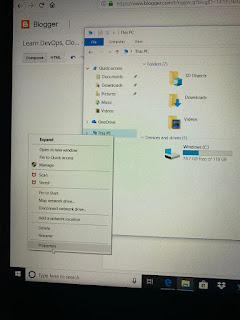
Choose right click on properties, Click on Advanced system settings.
Click on environment variables
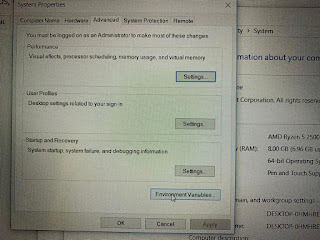
Click on Path --> Edit
Add path of directory where you extracted terraform.
C:\Users\<user_name>\Downloads\terraform
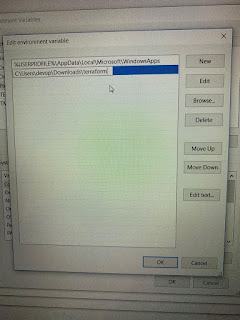
Click on OK, OK, Apply Save.
Verify Terraform installation
Now open git bash, type
terraform -version
Terraform v1.0.11
Open windows explorer, click on PC, click on properties.

Choose right click on properties, Click on Advanced system settings.
Click on environment variables

Click on Path --> Edit
Add path of directory where you extracted terraform.
C:\Users\<user_name>\Downloads\terraform

Verify Terraform installation
Now open git bash, type
terraform -version
Terraform v1.0.11


Learning Infrastructure as Code with Terraform is an excellent starting point for anyone interested in cloud deployment and DevOps practices. Exploring Cloud Computing Projects can further strengthen practical knowledge in cloud infrastructure management, resource provisioning, and scalable application deployment across modern cloud platforms.
ReplyDeleteOnce Terraform is configured successfully, users can also understand secure infrastructure deployment, access control, and policy management in cloud environments. Working on Cloud Security Projects helps in gaining practical experience with secure cloud architectures, compliance, and infrastructure protection while implementing Infrastructure as Code solutions.
ReplyDelete