Free live webinar • November 21, 2026 • 9:30 AM CST   Register free →
2017–2027Celebrating Our 10th Year

Transform Your Career.
Engineer Your Future.

Build the skills to become an AI-Enabled DevSecOps & Cloud Engineer with 15 weeks of live training, hands-on labs and personal mentorship.

Coach AK in his DevOps learning studio
Coach AK | Ananth KannanSenior DevOps & SRE Architect • Founder, CoachDevOps
3,500+Students Trained
25+ YearsIT Experience
15 WeeksLive Training
70+Hands-on Labs

Master In-Demand Technologies

AWSAzureDockerKubernetesTerraformJenkinsGitHub ActionsAnsibleGitLab

AI-Enabled DevSecOps & Cloud Engineering Bootcamp

Next weekend batch: December 5, 2026
Saturday 9:30–11:30 AM CST • Sunday 10:30 AM–12:30 PM CST

Live classes, practical projects, personal mentorship and career preparation.

View Program Details →

Real Students. Real Success.

Career milestones shared by our students.

✓ Placement in an AI role
“The concepts you taught have improved my technical understanding and confidence.”
ManimaranJuly 2026 Bootcamp
✓ DevSecOps Engineer offer
“I want to sincerely thank you for your mentorship, training, and support.”
Femi AshayeCoachDevOps Alumni
✓ DevOps Engineer offer
“I got an offer for Devops engineer Last week and happy to inform you. I really appreciate you.”
EbenezerCoachDevOps Alumni
View All Success Stories →

Individual student experiences; employment is not guaranteed.

Ready to Take the Next Step?

Explore the program or get answers to your questions before enrolling.

Friday, May 19, 2023

How to Deploy Springboot Microservices App into EKS cluster using Jenkins Pipeline and Helm | Deploy Microservices into EKS cluster using Helm and Jenkins Pipeline

We are going to learn how to automate build and deployment of Springboot Microservices Docker Container into Elastic Kubernetes Cluster(EKS) using Helm and Jenkins pipeline.

What is Helm?

Helm is a package manager for Kubernetes. Helm is the K8s equivalent of yum or apt. It accomplishes the same goals as Linux system package managers like APT or YUM: managing the installation of applications and dependencies behind the scenes and hiding the complexity from the user.

To learn more about Helm, please click here.

Sample springboot App Code:

I have created a sample Springboot App setup in GitHub. Click here to access code base in GitHub. 

Jenkins pipeline will:

- Automate maven build(jar) using Jenkins
- Automate Docker image creation
- Automate Docker image upload into Elastic container registry(ECR)
- Automate Springboot docker container deployments into Elastic Kubernetes Cluster using Helm charts


Pre-requisites:
1. EKS cluster needs to be up running. Click here to learn how to create Amazon EKS cluster.
2. Jenkins instance is up and running
3. Install AWS CLI on Jenkins instance
4. Helm installed on Jenkins instance for deploying to EKS cluster
5. Install Kubectl on Jenkins instance
6. Install eksctl on Jenkins instance
7. Install Docker in Jenkins and Jenkins have proper permission to perform Docker builds
8. Make sure to Install Docker, Docker pipeline 


10. Dockerfile created along with the application source code for springboot App.
11. Namespace created in EKS cluster

The Code for this video is here:

Create Helm chart using helm command
Go to your root of repo where you have source code for your springboot application. Create helm chart by executing below command:

helm create mychart
tree mychart
Execute the above command to see the files created.


Add Docker image details to download from ECR before deploying to EKS cluster
open mychart/values.yaml.


Enter service type as LoadBalancer
And also
open mychart/templates/deployment.yaml and change containerPort to 8080


Save the files, commit and push into repo.

Step # 1 - Create Maven3 variable under Global tool configuration in Jenkins
Make sure you create Maven3 variable under Global tool configuration. 


Step # 2 - Create a namespace in EKS
kubectl create ns helm-deployment

Step # 3 - Create a pipeline in Jenkins
Create a new pipeline job.

Step # 4 - Copy the pipeline code from below
Make sure you change below red marked values as per your settings highlighted in yellow below:

pipeline {
   tools {
        maven 'Maven3'
    }
    agent any
    environment {
        registry = "account_id.dkr.ecr.us-east-1.amazonaws.com/my-docker-repo"
    }
   
    stages {
        stage('Cloning Git') {
            steps {
                checkout([$class: 'GitSCM', branches: [[name: '*/master']], doGenerateSubmoduleConfigurations: false, extensions: [], submoduleCfg: [], userRemoteConfigs: [[credentialsId: '', url: 'https://github.com/akannan1087/docker-spring-boot']]])     
            }
        }
      stage ('Build') {
          steps {
            sh 'mvn clean install'           
            }
      }
    // Building Docker images
    stage('Building image') {
      steps{
        script {
          dockerImage = docker.build registry 
          dockerImage.tag("$BUILD_NUMBER")
        }
      }
    }
   
    // Uploading Docker images into AWS ECR
    stage('Pushing to ECR') {
     steps{  
         script {
                sh 'aws ecr get-login-password --region us-east-1 | docker login --username AWS --password-stdin account_id.dkr.ecr.us-east-1.amazonaws.com'
                sh 'docker push account_id.dkr.ecr.us-east-1.amazonaws.com/my-docker-repo:$BUILD_NUMBER'
         }
        }
      }
        stage ('Helm Deploy') {
          steps {
            script {
                sh "helm upgrade first --install mychart --namespace helm-deployment --set image.tag=$BUILD_NUMBER"
                }
            }
        }
    }
}

Step # 5 - Build the pipeline


Step # 6 - Verify deployments in EKS
Execute the below command to list the helm deployments:
helm ls -n helm-deployment


kubectl get pods -n helm-deployment

kubectl get services -n helm-deployment

Steps # 7 - Access Springboot App Deployed in EKS cluster
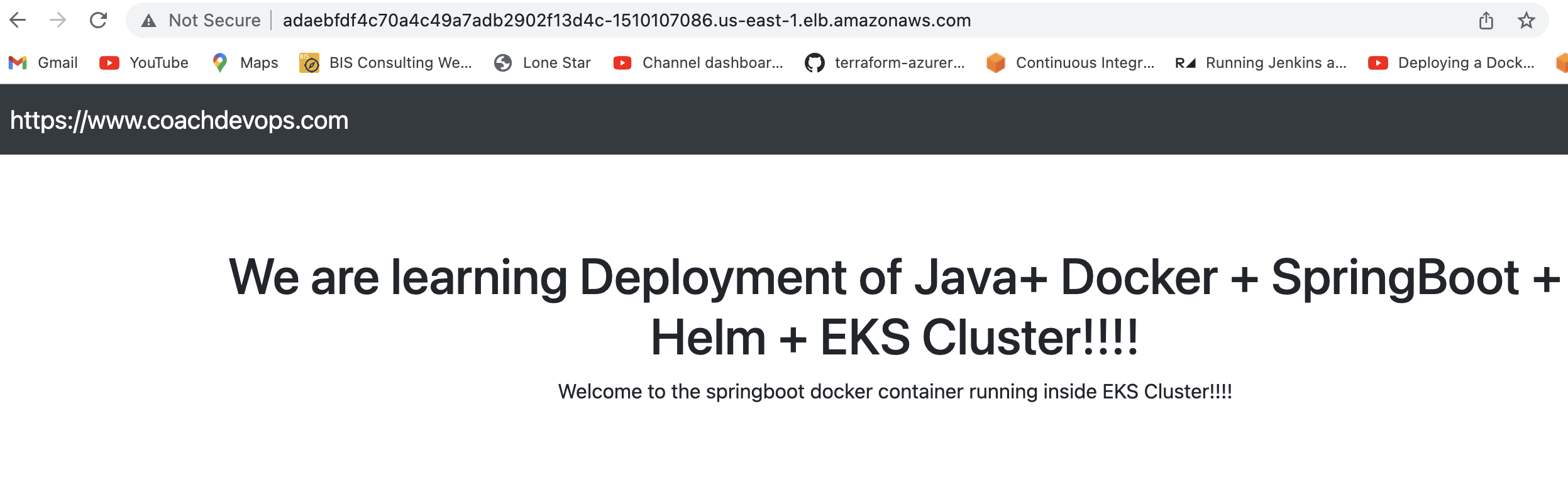
Once deployment is successful, go to browser and enter above load balancer URL mentioned above

You should see page like below:

Cleanup EKS Cluster using eksctl
To avoid charges from AWS, you should clean up resources. 

eksctl delete cluster --name demo-eks --region us-east-1


Watch steps in Youtube channel:

Errors during Deployment:
If you are running into any Deployment errors like below from the pipeline, you can fix it by downgrading helm version.

Root cause and fix:
Downgrading helm version to 3.8.2 would resolve the issue.

curl -L https://git.io/get_helm.sh | bash -s -- --version v3.8.2

Click here for more information


1 comment:

  1. Automating the build and deployment of Spring Boot microservices using Jenkins, Docker, Kubernetes, and Helm is a practical approach to managing modern cloud-native applications. The step-by-step explanation of building Docker images, pushing them to Amazon ECR, and deploying them to EKS helps developers understand how application development connects with DevOps practices.

    A strong understanding of Spring Boot is an important foundation before moving into microservices development and deployment. A **Spring Boot ReactJS Full Stack Developer Course** can help learners develop backend application skills alongside frontend development knowledge, providing a broader understanding of how full-stack applications are structured.

    Similarly, the **Spring Boot NextJS Full Stack Developer Course** combines Spring Boot backend development with Next.js frontend development. Once developers understand how to build these applications, learning Docker, Jenkins, Helm, and Kubernetes can help them take the next step toward deploying and managing applications in cloud environments.

    ReplyDelete