Ansible is #1 configuration management tool. It can also be used for infrastructure provisioning as well. or You can use Ansible in combination of Terraform which can take care of infra automation and Ansible can do configuration management. We will be setting up Ansible on Azure Ubuntu VM.
Ansible Architecture:
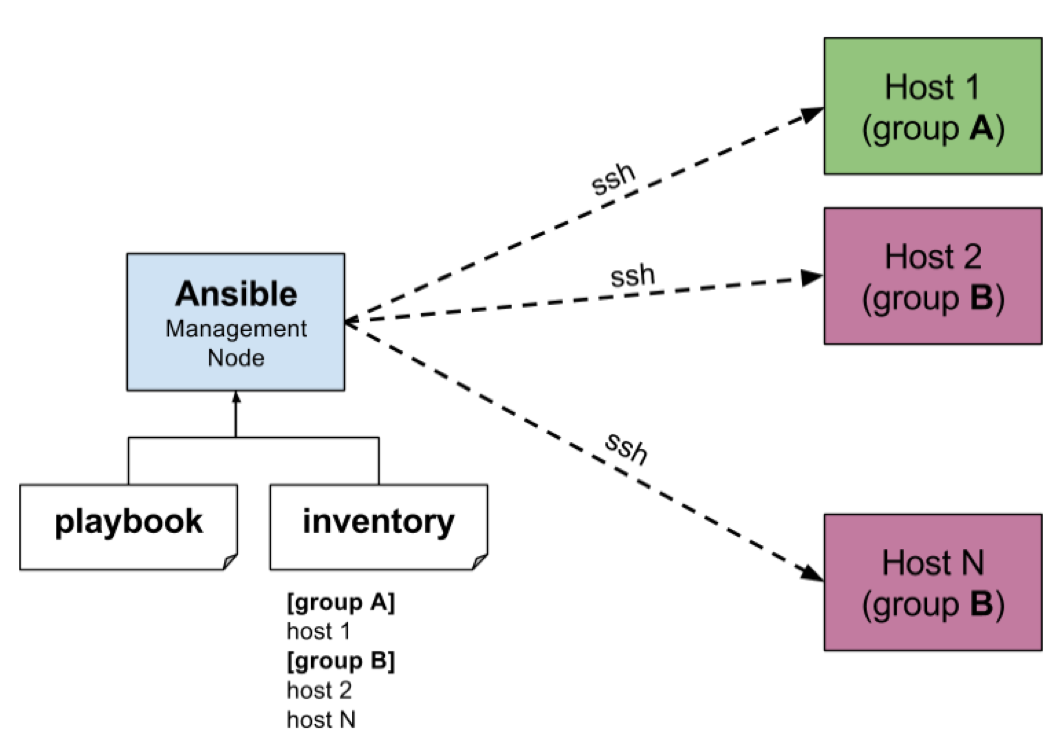
The best way to install Ansible for Ubuntu is to add the project's PPA (personal package archive) to your system.
Pre-requisites:
Create new Ubuntu VM in Azure Cloud for installing Ansible, just open port 22.
Change host name to AnsibleMgmtNode
sudo hostnamectl set-hostname AnsibleMgmtNode
Update Repository
sudo apt-get update
Install Python-pip3
sudo apt install python3-pip -y
Upgrade pip3
sudo pip3 install --upgrade pip
# Install Ansible.
pip3 install "ansible==2.9.17"
# Install Ansible azure_rm module for interacting with Azure.
pip3 install ansible[azure]
# Install Ansible.
sudo apt install ansible -y


No comments:
Post a Comment